Showing posts with label assessment. Show all posts

Monday, March 27, 2017

SMART Board Games: SMART Lab Activities

The activities I mention in the video below are all games you can create in less than 5 minutes for your classroom. They are all available in the most recent version of SMART Notebook (16.2). You may need to check for updates, however. To do so simply launch SMART Notebook, and then click on Notebook > Check for Updates and Activation


Then just click on the Update button next to SMART Notebook, and enter your password to your Mac, and let it download and install. If you have troubles, feel free to ask Greg, Kevin, or myself to take a look. 

Once you’ve done this, you are all set to try out the fabulous activities inside of the SMART Lab section. Like I mention in the video, these are a great way to create classroom review games with no additional software or website sign up required. Some you would play full class on your SMART Board and others can be accessed with student devices.  My hope is that you will choose at least one of the following short videos at the page below, watch it, and immediately build a game activity for your classroom to try tomorrow. 

Let the SMART Board Games Begin!


SMART Notebook Games
 https://spark.adobe.com/page/NHDK0N6wH8hD1/ 

Friday, September 23, 2016

iPads in Elementary! (Resources from ESU 8 - Sept. 2016)

Two great events at ESU 8 schools were held this week.  As we visited with teachers there, they were looking for ways to better integrate iPads in their elementary classrooms.  The following site of resources was a collective effort from the ESU 8 team to share our ideas with our schools.

https://sites.google.com/a/esu8ne.org/ipadsatevelem/home

Take time to learn more about the SAMR model by exploring the "Where are we headed" tab.

LEARN: Learn about apps for curriculum review and research in the "Curriculum skills practice" tab.

CREATE: Experience apps for student creation in the "Student Creation" tab.

ASSESS: Gather more information about the learning in your room with the "Formative Assessment" tab.

Then wrap it all up by looking at your own BrightBytes data and deciding what your "Next Steps" are.


Tuesday, August 30, 2016

Back to School with Google Education


Be sure to watch the recorded Hangout on Air from Mickie Mueller and Otis Pierce, moderators of the GEG Great Plains group, as they share Back to School updates from Google Classroom, Google Forms, and more. 

Highlights include:

Google Classroom
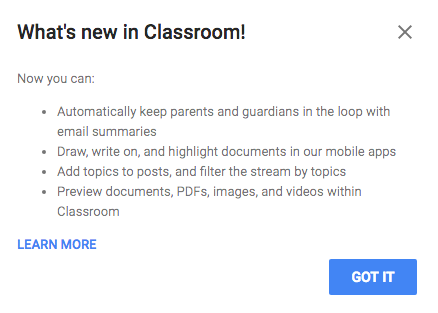
  • Topics (can be used similar to tags, for sorting & categorizing posts)
  • Default = no due date
  • Preview YouTube, documents, etc. right in Classroom window
  • Parent/Guardian access (you have to enable in Students tab and manually enter emails)
  • Schedule a post
Google Forms
  • Quizzes (MC, choose from a list, checkboxes) but no need to use Flubaroo for simple quick quizzes
  • Can send feedback (including a link) with corrected quizzes
  • Add pictures to answer choices on form questions


Also be sure to check out Mickie's guide to Google Classroom: 
https://sites.google.com/site/gclassroomguide/

And her Google Forms Quizzes playlist:
https://www.youtube.com/playlist?list=PLPv3PEdH_agtyeg9eIQH4q_LfjnlkwBLi

Wednesday, April 20, 2016

Classroom Tools for Formative Assessment

Whether the school year is beginning, underway, or coming to a rapid close, quiz and gameshow type tools are a welcome tool for any teacher's toolbox.

For this week's ESU 8 Wednesday Webinar I shared a brief message about Classroom Tools for Formative Assessment. You can view the entire 30 minute webinar here:


I created the following chart to do a snapshot side-by-side comparison of the 6 featured tools:


and it is included in the Accompanying Resources I have collected here:


However, if you are already familiar with one or more of these tools, consider individually visiting a short video for each.  With just about 3 minutes of your time, you can try a new formative assessment tool each week for the rest of the school year!

Socrative


Kahoot


Quizizz


PearDeck


Nearpod


Formative


Like I have mentioned many times, these are just a few of my favorite formative assessment tools. The wonderful thing is that we as teachers have so many options available for our classrooms, and with more being added everyday.  If you have a favorite formative assessment tool that you would like me to review and/or support implementation of, just let me know!  Until then, keep assessing FOR learning with classroom formative assessment tools.