Showing posts with label schoolvisits. Show all posts

Monday, April 20, 2020

Awesome Augmented Reality with EyeJack


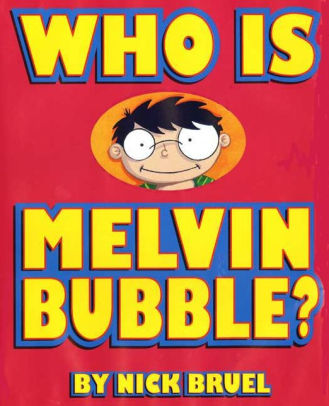
Shirley Rossman, 4th Grade Teacher at West Holt Elementary, leads her students in a creative autobiographical writing project each year. Based on the book "Who is Melvin Bubble?" by Nick Bruel, students engage in perspective writing, as each page describes themself through the eyes of a friend or family member. The final page is all about the student from the point of view of the student themself, and this is where we collaborated for an augmented reality twist to this project. 

  • Students wrote their drafts on paper and collected digital images of the family members and friends who were "telling the story."
  • I created a template file in Keynote that students could personalize with their content and eventually export as pdf for self-publishing/printing. 
  • Using the camera on an iPad, students took pictures of each of their handwritten final draft pages and added them to the appropriate placeholders in the Keynote template.
  • Each photo of the "narrator" of the page was opened in the Clips app, a cartoon filter was added, saved to camera roll, and then Airdropped to the students to add to their book file. 
  • We took photos of the students themself (one close up of their face for the cover and a full-body waving shot for the first and last pages) and used the Clips app to "cartoonize" and Airdrop as well. 
  • Using the free voice memos app each student recorded an audio narration of their final page of text (explaining who they are from their own point of view). 


Using Keynote again, students created an animation for their final page. The trigger image was their waving photo. It was added to a slide and then that slide was duplicated. Slide 1 will become your trigger image (export as png with transparent background) and Slide 2 is where you lock the image to the background and then create your animation around it. Then shapes, drawings, images, etc. were added, formatted, and then animated with motion paths and effects. Timings could be set to automatic, but students were encouraged to aim for about 30 seconds of total animation length (to match the maximum audio recording duration). When complete, the background image was unlocked and deleted, the slide background was set to transparent, and the 2nd slide was exported as a gif. 

I used the EyeJack Creator app (free download for Mac) to assemble each student's augmented reality experience for their final page. 
  1. Add trigger image (exported png from 1st Keynote slide)
  2. Upload animated gif (exported from 2nd Keynote slide)
  3. Add audio (mp3 from Voice Memos)
The EyeJack Creator app generates a QR code which is also saved and placed on the page in each students' Keynote "book."

Now, when people read their book, they use the free EyeJack app on their phone to scan that QR code and then hover over the trigger image on the page to see the animated come to life in AR. 

Each student's finished Keynote book was exported as a pdf. 
I used the softcover Tradebook option (Economy, color) on blurb.com to order a printed copy for each student and their family. (Approximately $5 each when all was said and done.)


In addition, for fun, I made a version for Mrs. Rossman and myself that had just the final page from every student's book into a class compilation of Augmented Reality student "About Me" animations. 


Tuesday, October 29, 2019

Monster Character Maker

Mrs. Jenny Alder's 4th grade students at Stuart Elementary were kind enough to help me create some monster characters!

Using the brilliant activity from Laura Wright's WrightStuff Interactive, airdropped via Apple Classroom, students got right to work creating unique monster characters in Keynote. 


What resulted was a diverse conglomeration of mostly-friendly monsters, complete with name and the artist's autograph. 


Now the 4th graders will employ their creative writing skills to bring their monster characters to life in writing!


Digital Design class getting creative with dSLR camera

Mrs. Kristen Evans's Digital Design class at Neligh-Oakdale High School has been putting industry-standards gear into their classroom practices.


Through an intro to digital photography they have been exploring basics of dSLR cameras as well as general principles integral to mobile photography as well. 


Students use their creative "mind's eye" to MAKE photos and not just TAKE photos.


There are so many great resources available on digital photography, many which are free.
I recommend the following for sure:
https://books.apple.com/us/book/stories-through-the-lens/id1039622883
https://books.apple.com/us/book/basic-photography/id795960902


But the most important element to successful photography is simply to look, notice, wonder, and capture LOTS of shots. 


This class is well on their way to developing their craft and putting it into practice in the community around them. 

Sunday, October 20, 2019

2019 DigCit Week - Student creations

Students from ESU 8 who attended this year's Nebraska Digital Citizenship Symposium created positive campaigns to take back to their school and community for DigCitWeek 2019.

O'Neill High School

8th grade students from O'Neill High School created the following video PSAs to share with students at both the Elementary and High School buildings.


In addition, this O'Neill High School Digital Citizenship team appeared on Eagle Eye Broadcasting- Daily Announcements during DigCit Week and shared their message. 


West Holt High School

7th grade students from West Holt created a social media campaign with graphics shared on their school twitter channel all week long. 


Ewing Public School

6th and 7th grade students from Ewing Public School organized a TikTok challenge for Digital Citizenship Week. 


Thank you, ESU 8 students, for showing all of us how we can each "Be the One" to make a difference online. 

Monday, February 12, 2018

"The Important Thing" about Augmented Reality

The important thing about augmented reality is that it is a great way to merge digital and analog student-created content. It is true that with the free app Blippar, it is simple enough for third graders to use. It offers great options for a student publishing project, and will likely response many positive reactions from your entire learning community. But the important thing about augmented reality is that it is a great way to merge digital and analog student-created content.

Many may recognize this text pattern from Margaret Wise Brown's The Important Book. Recently this text was used as the basis for a third grade project in Mrs. Pistulka's reading class while learning about their local community history.

Katie Morrow from ESU 8 worked with the class to assemble the pages students wrote and the illustrations they created into a book modeled after “The Important Book” by Margaret Wise Brown. Then we made the pages “come alive” through augmented reality. Basically, if you download the free Blippar app on your smart phone, and enter our localized "code", then you can scan the pages of the book and videos will “pop up” where the students teach you even more!

Here are the steps completed in the process:

  1. Mrs. Pistulka encourages her reading class to learn about community history in creative ways. First students learned about O'Neill's past by interviewing a local historian and viewing past projects.
  2. Second, students selected a key person who has had an impact on our community of O’Neill. Each 3rd grader researched their "Important Person” and took notes. 
  3. They then wrote their narratives for the pages of the book, modeled after Margaret Wise Brown’s The Important Book.
  4. Next, students decided on an additional fact or interesting tidbit to share out loud in their video.
  5. Mrs. Morrow helped us film in front of a greenscreen that we borrowed from the Eagle Eye News crew.
  6. Each student created an illustration to go with our page and hand-wrote our “Important Book" text onto a template page. 
  7. Mrs. Morrow took photos of all our pages and uploaded them to BlippBuilder hub to make them come alive with Augmented Reality (AR).
  8. Finally, Mrs. Pistulka sent our book off to be printed so we could share our creation with others!


And here is the end result:

on iBooks (free for anyone with a Mac or iPad to download and try out)
The Important Book of O’Neill, Nebraska

and physical books printed through Blurb.com (approximately $6 for each economy color, soft-bound  trade book).

Friday, March 17, 2017

St. Patrick's Day Writing from First Grade iPad Authors

    Are you as excited for St. Patrick’s Day as the creative First Grade Authors in Mrs. Willis’s class are?

    Students personalized the leprechaun character in their stories with Toontastic 3D
    Follow one leprechaun’s adventures in O’Neill as he searches for the pot of gold on St. Patrick’s Day.  

    Skills addressed:
    • Creative writing
    • Oral reading fluency
    • Story elements  (setting, characters, beginning, middle, and end)
    • Local community history and traditions (O’Neill St. Patrick’s Day Celebration)
    • iPad skills 
    iPad apps utilized:
    Our process included brainstorming ideas and writing the stories on paper with Mrs. Willis. When Mrs. Morrow worked with us on the iPads we created the setting and characters for our stories and recorded the animations with the Toontastic 3D app. Then each student created their own Book Creator project and designed their pages by adding the typed text of their story, their Toontastic animation, additional illustrations, and of course, their signature. Each student’s individual Book Creator pages were Airdropped to Mrs. Morrow’s iPad to be combined into one class book. Students brainstormed the facts for the ‘Did You Know?’ pages in between each of the leprechaun’s adventures. Finally, we filmed the conclusion for the book all together and added it to the last page of our Book Creator project. 


    So, how can you experience this creative story? 
    Luckily, you have three options. 

    1. If you have an iPad or a Mac, download the free iBooks app. 
    Use your Apple ID to download a free copy of the book and then read in iBooks. 
    *This is the most fully functional version of the product. You can swipe to turn the pages and click on the videos to play within the story. 
    View in iBooks: https://itunes.apple.com/us/book/id1216353000 
    2.  If you do not have an iPad, but have another type of digital device, you can “read” the whole story as a video on YouTube. 
    The video of the whole book is over 18 minutes long, but you can easily skip around to find your favorite parts.  
    *TIP: Be sure to watch the ending of the story, no matter what! It starts around 17:44

    3.  A final option would be to stop in the 1st Grade classroom and read the book there. We will have a printed version on paper (minus the student voices and videos) as well as being able to view on the school iPads. 


    Happy St. Patrick’s Day from some amazingly creative iPad authors!


    Friday, October 14, 2016

    Honey bees in a hologram?

    Mrs. Rossman's 4th grade students at West Holt Public School have become experts on honey bees! They wanted to share what they learned with others and thought that creating a hologram might be a memorable experience for all.


    First the students researched and learned all the amazing facts about the honey bee. They compiled their research into topics and each constructed a short "script" to explain key findings.

    I (Mrs. Morrow) visited the group and showed them how to build hologram "projectors" to use to view hologram videos (from YouTube) on their iPads.  Each student built their own and many questions were asked that added to our collective curiosity, such as "What is the biggest hologram we could create?"

    On my next visit, I worked with the kids to begin to create their video.  We decided that the best approach would be a live action video (rather than an app-animated video) and knew we needed to film in front of a green screen in order to make our video appear on a solid black background (for the hologram).

    Mrs. Rossman and the students collected great props and costumes and the students brought their scripts to life in front of the green screen!


    I initially planned to use the DoInk Green Screen app to assemble the clips, but it was actually easier to do the additional editing (and the green screening) all in iMovie on the Mac.  This made adding the voice over even easier as well.


    On my last visit with the group, the kids each recorded their scripts narrating the scenes as voice-overs right in iMovie.  In doing so, they could view the source clip in real time and time out their reading somewhat.

    We exported from iMovie and had one full size video, which can be viewed on YouTube here:


    The final step was to AirDrop this video to each of the students' iPads.  We started a new Keynote file, widescreen format with black background. We inserted the video once and re-sized it to smaller dimensions. Then we copied and pasted, and rotated the video three more times. (90 degrees, 180 degrees, and 270 degrees) Using Keynote's guides we aligned the four videos so that all the "feet" were touching the inside borders, and attempted to make that interior "window" in the shape of a square.  An animation needed to be added to all four videos so that they all played automatically in unison (and not in succession of each other).


    Note from Katie: The widescreen format of our video proved challenging to forming that inner square. It was a bit easier to see if we changed the background color of the Keynote slide to something other than black, and then changed it back at the end. I overlapped the videos a bit trying to get the hologram image as large as possible, but still somewhat centered in the projector pyramid. Also, I muted the sound (turned volume to 0) on three of the video clips to avoid the echo-ish sound that is typical of these video projects.  


    So, now our hologram video was complete and we published it on YouTube as well.  Now any iPad with any hologram projector anywhere can enjoy the amazing bee knowledge of these fabulous 4th graders!

    Friday, September 23, 2016

    iPads in Elementary! (Resources from ESU 8 - Sept. 2016)

    Two great events at ESU 8 schools were held this week.  As we visited with teachers there, they were looking for ways to better integrate iPads in their elementary classrooms.  The following site of resources was a collective effort from the ESU 8 team to share our ideas with our schools.

    https://sites.google.com/a/esu8ne.org/ipadsatevelem/home

    Take time to learn more about the SAMR model by exploring the "Where are we headed" tab.

    LEARN: Learn about apps for curriculum review and research in the "Curriculum skills practice" tab.

    CREATE: Experience apps for student creation in the "Student Creation" tab.

    ASSESS: Gather more information about the learning in your room with the "Formative Assessment" tab.

    Then wrap it all up by looking at your own BrightBytes data and deciding what your "Next Steps" are.