Either recently released or new this school year, we didn't want you to miss the opportunity to incorporate these important instructional technology lessons into your curriculum.
How Computers Work free video series with related careers from Code.org target audience: MS-HS
There are many times when a need exists for results from a Google form to be instantly shared beyond the person completing the form.
An administrator completing a walk-through observation who wants to send the results to the teacher just observed, and/or another supervisor
A teacher completes a grading rubric for each student assignment and wants the results instantly sent to the student
A band director hosts a regional event asking participating schools to sign up via a form, but wants a copy of their submission information to be shared back for reference purposes
A staff developer collects feedback on a professional learning event and wants to share the results with a team
The list could go on and on.
Several solutions exist for creating a workflow to collect information via Google form and then instantly share with multiple desired parties. The following is one simple way that anyone could get started on their own.
It utilizes an Add-On called Form Mule.
Build the Google Form. *Be sure that you have one question with a drop down menu of choices of all your desired recipients’ email addresses.
Make sure the form results are going to a NEW SPREADSHEET as the results destination.
Go to the Google Spreadsheet where the results are being collected.
Add-ons > Get Add-ons
Search for FormMule and add it
Add-ons > FormMule > Launch
Choose source data and merge type.
Set send conditions.
Save and then edit template.
When building the template, use fields from your form for both the send to (choose from the merge fields and the body of the email. (Add your email in the CC field and any additional info that you want viewable on every email.)
It may look something like this:
Preview and send all will go back and send to any previously submitted form results. Otherwise, complete a test form submission and try it out!
There were so many new resources for coding with kids available during the #HourofCode week for 2016 that I just had to share them with you through this blog post! Remember, that coding shouldn't JUST happen during Computer Science Education Week, but rather all year long! Actually, if you visit code.org NOW (following the completion of Hour of Code Week) it is even better, as your progress will be saved in the system. (It wasn't possible during the week of Dec. 5-9 due to the extremely heavy traffic to the site.) So, here are some of the new and applicable activities for schools for coding for this year's Hour of Code week and beyond:
Swift Playgrounds app
Apple recently released a free iPad app from which anyone can learn the Swift programming language. The Swift Playgrounds app will only run on a newer iPad updated to at least iOS 10, but if you are able to access it, you should definitely give it a try! The logic skills and fundamental coding lessons are excellent for any age (although geared more towards grades 5-8, in my opinion). Within the app you will find various challenges in addition to 'Learn to Code 1 and 2' including a special "Hour of Code" challenge, designed to be completed in about an hour. Also, don't forget about the free teacher's guides available, making exposure to coding easy for an educator to implement regardless of personal experience.
Code.org
If you don't have a new enough iPad to run the Swift Playgrounds app, there are plenty of alternative options. Choose an 'Hour of Code' activity to get started and then go beyond an hour by joining a self-paced course.
Some of the Hour of Code activities that students really enjoyed from the Code.org website this year included the following:
Also, check out Mickie's coding LiveBinder: http://www.livebinders.com/play/play?id=1463396 ESU 8 schools who participated in Hour of Code activities were numerous! I was personally able to visit several classrooms and lead a few activities myself. It was wonderful to see firsthand students' excitement and ability to master the art of block coding in a very short time. The rich dialogue, college and career-ready skills, and deep life lessons that come from these student experiences validate the small amount of time they take in our schools. If we have the opportunity to hook one kid onto something that he or she can continue to pursue independently, we have opened a tremendous doorway for their future!
2016 Hour of Code photos from ESU 8 ... click to advance images
ESU 8 is excited to announce a new challenge encouraging everyone to advance
their technology skills. With recent technology certifications announced by both
Apple and Google, educators can pick their platform of choice and work through
the quizzes to achieve certification status.
Work through the quizzes, digital badges, and certification tests on your own... or
ask your ESU 8 Technology Integrationists for help. After each certification
achieved, submit your name to be recognized on the Honor Board and in various
ESU 8 publications. If you have already earned either of the certifications, we still
encourage you to submit your name and celebrate your professional
accomplishments.
Each entry to the form on the ESU 8 website will also enter your name in a
drawing for a technology integration day provided by ESU 8 for your
classroom. (Drawings to be held March 1, 2017.)
Although this free online presentation is from a couple years ago, the content is still relevant and valuable if you teach in a Google Apps school. Consider perusing the slides to see if you can come across any new ideas for integrating Google Apps for Education into your teaching and learning.
2. Google for Education Training Center - Get certified
In addition, the Google for Education Training Center offers a plethora of resources for diving deeper with your educational application of Google Apps. Educator Level 1 and Level 2 certification quizzes are offered for $10.00 each, but you can learn a lot from the training resources without paying for the certification.
Be sure to watch the recorded Hangout on Air from Mickie Mueller and Otis Pierce, moderators of the GEG Great Plains group, as they share Back to School updates from Google Classroom, Google Forms, and more.
Highlights include:
Google Classroom
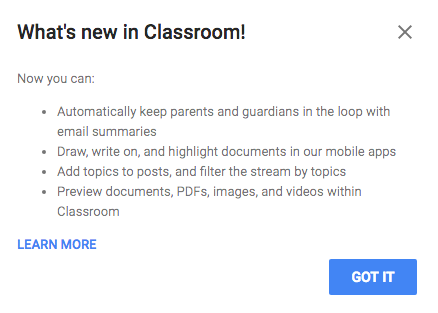
Topics (can be used similar to tags, for sorting & categorizing posts)
Default = no due date
Preview YouTube, documents, etc. right in Classroom window
Parent/Guardian access (you have to enable in Students tab and manually enter emails)
Schedule a post
Google Forms
Quizzes (MC, choose from a list, checkboxes) but no need to use Flubaroo for simple quick quizzes
Can send feedback (including a link) with corrected quizzes
The following resources are a sampling of what I have shared with schools interested in the possibilities of Google in education. Basically, this is simply an overview what is possible. Educators are encouraged to pick and choose several tools or things they want to try and then dig in more deeply with the many resources available.