Showing posts with label edtech. Show all posts

Monday, September 3, 2018

Students Authoring Books with Pages


Every year on September 8, International Literacy Day is celebrated. In conjunction with this year's celebration, AppleEDU has launched a #PagesBookChallenge. The challenge is simple. Create a digital book with your students in Apple's Pages app (free creation app for Mac or iPad). Then, simply tweet a short synopsis of the book along with its cover and tag #PagesBookChallenge.


To encourage all educators to participate here a series of short tips and recommendations for creating digital books with Pages.

1. Begin a new Pages project using the Books templates.

Tip: Use Portrait templates for primarily text-based books (so that the reader can resize the text and the pages will adjust accordingly) and Landscape for fixed layout books (where you control the exact design and layout of the pages and the reader cannot adjust).

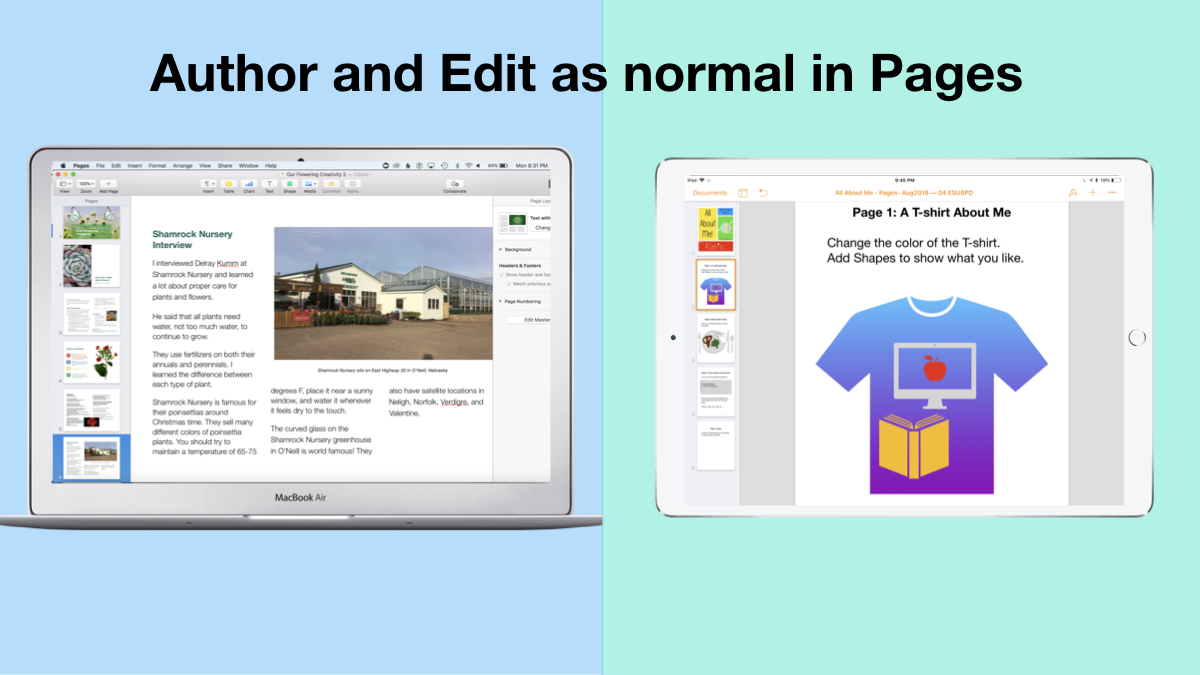
2. Author and Edit as you normally would in the Pages app. 

The beauty of the iWork suite, in my opinion, is its simplicity and consistency across apps. Unleash your creativity!
3. Add narration with authentic audio

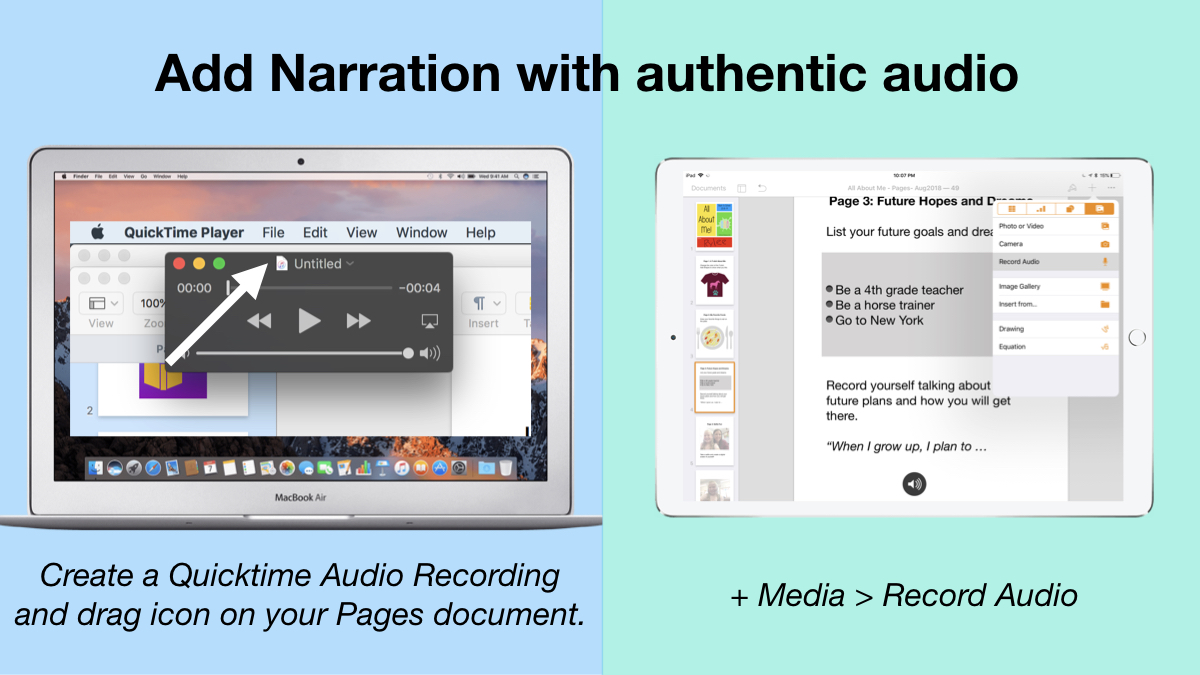
On Mac: Create a Quicktime Audio Recording and drag icon next to filename onto your Pages document.
On iPad: Tap the +, choose the Media tab, and Record Audio, then add to page.
4. Export as ePub for Publishing and Sharing.

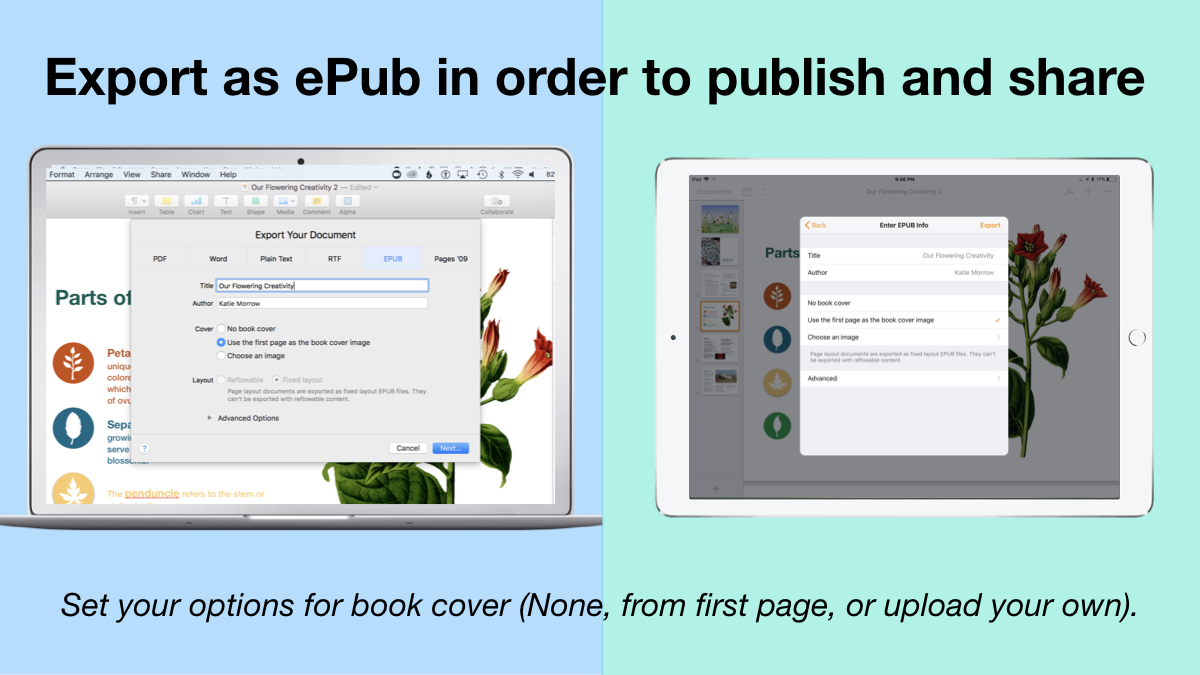
Title your book and name the author. Set your options for book cover: (None, from first page, or upload your own).
There you have it! Anyone can create a book with Pages. 


 Student books authored in Pages by Mrs. Troester's English 8 class, Spring 2018. (Science "Explainer" books for younger learners)

As educators the possibilities are endless when authoring books with Pages. To help learners experience authentic authoring, encourage them to work through all stages of the writing process. Here is a 60 second reminder of how to do so within the Apple ecosystem.


Finally, teachers can use Pages templates to help students focus more on the content of their books, and less on the the design of the pages. Whether for professional learning experiences, class books where every student authors a piece, or even shorter individual writing projects, simply create a Pages book as a starting template. Share the Pages document as a starting point and allow the learners to customize the content. Be sure to take advantage of the following features:

Media placeholders

Add image gallery placeholders from the Media button. This is a preset placeholder for the author to add an entire gallery of images.

Add text boxes and utilize Paragraph Styles

Text boxes are automatically ready as placeholders. Simply change the paragraph style and/or formatting.

Build your own photo/video placeholder

Add an image (or screenshot). Select the image and choose:
On Mac: Format > Advanced > Define as Media Placeholder

Add pages as desired and distribute to all your budding authors.  

I cannot WAIT to see what creative ideas you and your students have when creating books in Pages!


Thursday, May 17, 2018

Six Shot Stories

Every once in awhile you find that tech integration idea that withstands the test of time. Even as the tech tools evolve and change, the learning still holds its value. "Six Shot Stories" is one of those practices for me. As an English teacher, the value of writing Six Word Memoirs created numerous educational benefits with my students. Theme, concise word choice, summarization are all skills emphasized with this simple activity. Pairing the concept with media was brilliant, and Don Goble's One Best Thing book: "Six-Word Story, Six Unique Shots" remains an invaluable resource for delivering the lesson to students.

https://itunes.apple.com/us/book/six-word-story-six-unique-shots-enhancing-writing-through/id846218165?mt=11  
Recently I worked with the 4th grade classes at West Holt Elementary to share their school's stories through this technique. And Apple's Clips app on iPad was the perfect medium to create some powerful digital stories in a short timeframe.

I began the lesson by viewing Apple's latest commercial for iPad "Homework" and asking students to count the number of cuts, in order to establish the importance of storytelling through a wide variety of camera angles and shots.

Then students paired up to author a Six-Word Story about their school, their classroom, or their daily activities as 4th graders at West Holt Elementary. It is amazing to see such powerful stories created in just six words by students!

I used Don Goble's book on iBooks to demonstrate different shots that were possible, and reminded students of some simple best practices when capturing with iPad. Instructions were emphasized that each shot should be between 3 and 5 seconds and no technique should be repeated (each shot is unique). Students used a storyboard to plan their six shots and then used the camera app to capture each on their iPad.

Finally, with only literally a few minutes of instruction on the Clips app, students assembled and edited their story. Some added all six words of text at the very end, some used one word per shot, and others split up the text in varying ways. Many were able to experiment with the other creative features of Clips as well, even within the one-class time period we had together. Each team of students exported their product to camera roll, then Airdropped to their teacher's Mac in order to upload on a YouTube channel and organize in a playlist.

What I appreciate most about this project as an ELA teacher, is the tremendous focus on concise, clear communication it entails. As a technology teacher I value the creativity and composition techniques that allow student media production to instantly be raised to the next level.

Enjoy some of West Holt Elementary's Six Shot Stories!


Saturday, February 13, 2016

Career Day at Madison Public School


Friday, February 12, 2016 was a career exploration day at Madison Public School, and I was lucky to be invited to participate. Every student in grades 9-12 rotated through eight different sessions with professionals sharing about their chosen career path.  The day was designed by Karla Kush, Guidance Counselor and Jim Crill, HS Principal, and Madison has done variations of the experience several times in the past. What a great opportunity for students to link purpose for what they are doing in school and discover many different options for professional ambitions! 

Guest speakers at Madison Public School's Career Day, February 12, 2016
In each of the 8 rotations, students were tasked with completing a "Career Report" which not only helped guide the discussions, but also helped students make connections to their personal goals.


I shared about my role as a Instructional Technology Facilitator and the convergence of the fields of education and technology. 

I began by sharing a brief story of my journey to getting to my current professional role. 


Next, I talked about some of my experiences through the SMART Exemplary Educator, Google Certified Teacher, and Apple Distinguished Educator programs, and what leading technology companies today are looking for in future employees.  Instead of seeking "clicking skills," software expertise, or even GPA, it is more important to have innovative ideas and the ability to prove yourself as a self-directed learner. 


I encouraged students to open their minds to additional opportunities that exist within the fields of educational technology.  When I think about all the "jobs" that I have had even as "just a teacher" it is really mind-boggling.  In education you can not only be a teacher, but a writer, presenter/speaker, leader/administrator, coach, counselor, media specialist, tutor, curriculum developer, and teach online classes. In the field of technology I have had experiences with web design, coding, network & systems administration, social media, animation, graphic design, and multimedia creation, just to name a few. The possibilities are truly endless, if students are willing to approach the career with an open mindset and be willing to continually keep learning. 

And to do so, there is no time better than the present. I concluded by sharing three valuable tools/tips for pursuing any profession or career, even while they are still in high school.

1) Get motivated by TED Talks and see others' inspiring ideas take shape into action. Follow their lead or apply to your own passions. 


2) Learn anything, anytime, anywhere with iTunes U.  Don't limit yourself to the classes you take or what your teachers know. 


3) Be intentional about building a positive digital footprint-- starting right now.  Make yourself "google-able" and build a personal brand for yourself that showcases your talents, skills, and interests.  Start a blog or build an about.me page.  


We had great discussions with high school students about the exciting times we live in and the opportunities for all to follow their dreams.  Thank you, Madison Public Schools, for the chance to share my excitement for the field of educational technology with your bright youth!

Wednesday, February 10, 2016

SAMR for Educators: Teaching Above the Line

Lately I have spent a good amount of time working with educators on how to know that technology is having a transformative effect in our classrooms.  The SAMR model, developed by Dr. Ruben Puentedura, is a simple, but effective measuring stick to facilitate conversations and critical thinking around the application of technology in our schools.

To learn more you could begin with this Wednesday Webinar which gives a brief introduction to SAMR for Educators.

Some of my favorite resources to explore more are collected here:
Additional experiences to explore the SAMR model have been shared with these groups:

Definitely, if you remember one thing about SAMR, I would encourage every educator to engage in thoughtful reflection about the use of technology in their practice and the results for learning.  We should strive to integrate technology in ways that reach "above the line" in the SAMR model in order to expect to see transformative results. 

Monday, September 21, 2015

Keeping current with ed tech opportunities across Nebraska

NETA (Nebraska Educational Technology Association) has recently made some exciting announcements that can benefit any Nebraska educator.

First of all, annual membership in NETA is free.  That's right: Zero dollars.  No matter what subject area or grade level you work with, everyone should consider signing up.  The only difference between the current free membership and the paid $35 annual membership is a printed newsletter.  But by signing up here anyone can receive the same information and announcements in digital format for no cost at all.  This is something that I highly recommend and a great way to stay current with the ever-changing field of educational technology in Nebraska schools.

Secondly, NETA has made some changes to its many contests.  And now that they offer free membership to the organization, anyone can enter!  There are contests for students and for teachers and some open categories, all designed to highlight the great things that Nebraska schools are already doing with technology (as opposed to creating an entry specifically for a contest).  Entries are all submitted digitally and winners receive a free NETA Conference registration plus substitute reimbursement for the two days of the April conference(held April 21 & 22 in Omaha), a really great experience for any educator. For teachers there is an app smashing contest, lesson idea contest, video contest, grant and ISTE attendance opportunities. Student contests include logo creation, graphic imagery, infographics, and more. Read more about the NETA Contests, including the submission deadlines, by visiting this link.

An exciting opportunity exists for us in Nebraska this upcoming summer as the International Society for Technology in Education (ISTE) is holding its annual conference in Denver on June 26-29, 2016.  For many of us this offers a way to attend a high-caliber international conference without having to purchase a plane ticket. To make travel even more feasible, NETA is looking into possibly sponsoring a bus, with various pickup/drop off points across the state. If this is something you are interested in, you can fill out this form to learn more. If you aren't interested in coordinating travel with others, consider attending on your own. You can read more about ISTE 2016 here.

Another technology-related resource to take a look at is a pre-recorded free webcast from Nebraska Department of Ed on digital citizenship appropriate for all to view:
NCompass Live: Your Digital Footprint: Managing Your Online Identity

Finally, if any school has a group of students doing really great things with technology, considering inviting them to share at the NASB (Nebraska Association of School Boards) Student Showcase. Held like a traditional vendor or project fair during their yearly conference, students would man a "booth" and share firsthand their expertise with educational leaders from across the state. This offers valuable experience in presentation and communication for our young people, as well as an opportunity to showcase the positive learning happening with technology in our schools. If you are interested in signing up, please visit this form.