Showing posts with label #ESU8. Show all posts

Tuesday, October 29, 2019

Topics and Trends in Tech Integration (November newsletter article)

Topics and Trends in Tech Integration
By Katie Morrow, ESU 8


The following are current technology integration projects and practices that ESU 8 schools have been busy with recently. Remember that the invitation is always open if you see something from this list that you would like to try in your classroom. Contact us at ESU 8 and we would love to help get something planned in your school!
  • Digital book creation: A digital book is so much more than a book. Rather it is a container/organizer for all kinds of learning! Use a digital book as an investigation journal, a portfolio, a class collection of pages on a larger topic, or even a way to document a school event. Publish and share with the world without wasting any printer ink!
  • Creative media production: Whether a quick project like the greenscreen “Wormhole Challenge” or a class project like content area student-produced videos, students can practice interview skills, speaking skills, editing and creativity. Videos are a universal way to share what is being learned in the classroom with the rest of the world!
  • VR and AR: Virtual and augmented reality can bring content to life. Students can experience apps to take them places they couldn’t normally go: for example the inside of body systems or underneath the ocean floor. Also possible is students creating their own VR and AR creations with tools such as Google's Tour Creator, AR Makr app, or Blippar.
  • Digital resources for research: Utilize World Book online, Learn 360, or Virtual Field Trips to connect your class with first rate global resources- all with virtually no cost. Avoid simply going on a Google search and use higher quality resources for whatever your next educational project may be.
  • Blended Learning and PBL: Here’s a framework or a learning methodology to make your next project more student directed. Student agency empowers learners to be responsible for choices impacting their productivity and understanding of content. Make your next unit more personalized by blending in some project based learning or station rotation experiences.  
  • Gamify with assessment tools: Use technology for your next classroom review session and make learning fun! There are so many readily available formative assessment tools that you can choose a new one each unit so students don’t grow tired of any of them. Even some traditional tools have new features, so ask about ways to gamify that next class review session. 
  • Learning Management System tools like Canvas or Google Classroom: The easiest way to take technology integration to the next level in your classroom is to employ a system of content delivery and student interaction. Even Apple Classroom has updates to make their newest technology more manageable for all. Work with us to uncover ways your LMS can allow for more productive learning environments. 
  • Coding: Expose students to computational thinking by integrating some analog "intro to coding” activities. Or give them time to explore Swift Playgrounds on iPad or the code.org website. Or bring the Sphero programmable robots to your school for a coding kick-off activity. Once you get kids hooked, the sky is the limit for their future!

For additional ideas and examples from ESU 8 schools recently, be sure to check out my Instructional Tech at ESU 8 blog at: https://esu8tech.blogspot.com  

Wednesday, March 27, 2019

Six Shot Stories in Science

West Holt 4th graders are at it again! Turning their writing skills into six-shot stories with Clips. This year they took on the added charge of creating their stories about relevant science topics from a list Mrs. Shirley Rossman gave them.

They used a storyboard/planning document to help them plan their video stories, making sure they used six unique camera shots when filming.


Finally, they brought their Six Word Stories to life using Clips on the iPad.


Here are the final products:
Six Shot Science Stories playlist


AMAZING Animals books written by AMAZING Authors

For this 2nd grade class, this was the very first time they had ever used Pages... let alone create a digital book. 

They were excited about becoming authors! (mostly!)

I shared a simple template with them via Apple Classroom so that had a starting point for their Amazing Animal book. 
Download and open in Pages
Our first task was to find a cover image, change the opacity, and use the drawing tools in Pages to create original artwork. When the tracing image was deleted, students were so proud of their digital artwork! 


Of course, capturing "selfies" for their "Author the Author" page was pretty fun, too!
 

Next the students added content from their research on each of the pages, enhancing with copyright-friendly photos, shapes & drawing and even image galleries.  
   

The final step was to record audio. Some students recorded a reading of their entire "report" while others recorded bits of text from multiple pages. 


Students exported as ePubs and "handed in" their books via Apple Classroom, and Mrs. Krutz collected them all. To share with family and friends, I posted the epub files on a webpage and also made a screen recording video of each book, so that an audience without an iPad could still hear the students' voices. 

All in one day's work in a second grade classroom!
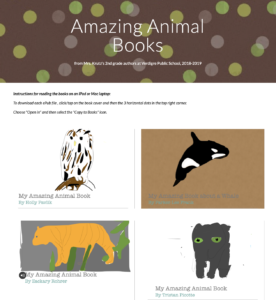
Amazing Animal Books by Verdigre 2nd grade


Thursday, January 17, 2019

Congratulations to 2019 NETA Contest Winners from ESU 8!

NETA recently announced their 2019 Contest results and several winners reigned from ESU 8.

Congratulations to the following:

Ashley Pischel, O'Neill High School
Teacher: Kevin Morrow

Jiya Chaudhari, O'Neill High School
Teacher: Kevin Morrow

Julia Emme, O'Neill High School
Teacher: Mike Peterson

Award winners will be recognized at NETA's Spring Conference, held March 28-29, 2019 in Omaha, NE. A complete list of the 2019 NETA Contest Winners can be found here


Third Grade Authors publish book about their community's history

The ABCs of Our Community, O'Neill on Apple Books Store
O'Neill Elementary's 3rd Grade Reading class, under the direction of Mrs. Julie Pistulka along with help from Katie Morrow, ESU 8, recently published their latest version of an annual community history research project. This year, the creative student authors compiled and shared their information in the form of an alphabet book.

Using a Pages template, each "letter" consists of 3 pages:
1) a stanza of poetry and photo gallery on the topic
2) written report from student research
3) student-created artwork
template created in Pages and distributed to student iPads via Apple Classroom

Students added audio narration for all the text with the newest feature of Pages books - Audio Recordings.

Learn more about the community of O'Neill, Nebraska as well as student creation of digital books with Pages on iPad by downloading the book from the Apple Books Store.


Thursday, May 17, 2018

Six Shot Stories

Every once in awhile you find that tech integration idea that withstands the test of time. Even as the tech tools evolve and change, the learning still holds its value. "Six Shot Stories" is one of those practices for me. As an English teacher, the value of writing Six Word Memoirs created numerous educational benefits with my students. Theme, concise word choice, summarization are all skills emphasized with this simple activity. Pairing the concept with media was brilliant, and Don Goble's One Best Thing book: "Six-Word Story, Six Unique Shots" remains an invaluable resource for delivering the lesson to students.

https://itunes.apple.com/us/book/six-word-story-six-unique-shots-enhancing-writing-through/id846218165?mt=11  
Recently I worked with the 4th grade classes at West Holt Elementary to share their school's stories through this technique. And Apple's Clips app on iPad was the perfect medium to create some powerful digital stories in a short timeframe.

I began the lesson by viewing Apple's latest commercial for iPad "Homework" and asking students to count the number of cuts, in order to establish the importance of storytelling through a wide variety of camera angles and shots.

Then students paired up to author a Six-Word Story about their school, their classroom, or their daily activities as 4th graders at West Holt Elementary. It is amazing to see such powerful stories created in just six words by students!

I used Don Goble's book on iBooks to demonstrate different shots that were possible, and reminded students of some simple best practices when capturing with iPad. Instructions were emphasized that each shot should be between 3 and 5 seconds and no technique should be repeated (each shot is unique). Students used a storyboard to plan their six shots and then used the camera app to capture each on their iPad.

Finally, with only literally a few minutes of instruction on the Clips app, students assembled and edited their story. Some added all six words of text at the very end, some used one word per shot, and others split up the text in varying ways. Many were able to experiment with the other creative features of Clips as well, even within the one-class time period we had together. Each team of students exported their product to camera roll, then Airdropped to their teacher's Mac in order to upload on a YouTube channel and organize in a playlist.

What I appreciate most about this project as an ELA teacher, is the tremendous focus on concise, clear communication it entails. As a technology teacher I value the creativity and composition techniques that allow student media production to instantly be raised to the next level.

Enjoy some of West Holt Elementary's Six Shot Stories!


Tuesday, October 24, 2017

Digital Citizenship Week 2017


Visit Digital Citizenship Week site

Digital Citizenship should not be an "event", but rather an everyday occurance.
However, this past week was a good reminder to be incorporating these important lessons for our students. 


At ESU 8 we celebrated by sharing a week's worth of proactive tips-- what to do before students get into trouble online-- to promote positive digital citizenship. 
Use any of the following as starting points to launch your next online learning experience for students. Or better yet, request ESU 8 to partner with you and support the journey.


Visit ESU8PD on Instagram for more instant PD tips.
Resources:
TextingStory app
ifaketextmessage.com

Resources:
Keynote
Bitmoji
WeeMee


Resources:
Share Your Work
Creative Commons

Resources:
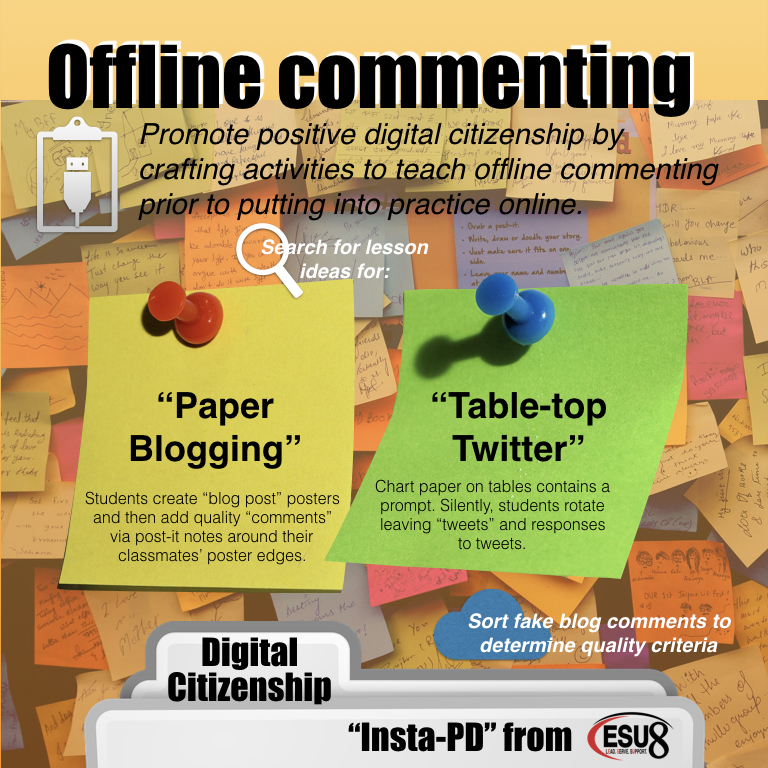
Paper Blogging
Table Top Twitter
Blog Comments Sort
Resources:
Common Sense Education
21things4students
Childnet
Media Smarts


Wednesday, August 16, 2017

Do More With... iWork

Let's take a closer look at what sets Apple's iWork apps apart from other app suites by exploring a few skills and accompanying projects possible in Keynote.
  • Use Shapes Library & Drawing Tools --- to create --- Infographics
  • Use Magic Move --- to create --- Animated Learning
  • Use Links and invisible buttons --- to create --- Quiz Shows

Don't hesitate to begin with the free Starter Guides from Apple Teacher:
Next explore the big ideas outlined above:

Use Shapes Library & Drawing Tools --- to create --- Infographics


Use Magic Move --- to create --- Animated Learning


Ben Mountz's 'Magical' Presentation about Keynote's 'Magic Move'

Use Links and invisible buttons --- to create --- Quiz Shows


This iTunes U course demonstrates how to use the slide linking feature of Keynote to create "Choose Your Own Adventure" type stories.
https://itunes.apple.com/us/course/write-your-own-adventure-interactive-fiction/id1032400189
And don't forgot about this Wednesday Webinar from last spring as an additional idea generator:


Critical Literacy: Text Dependent Reading & Writing for All


Critical Literacy: Text Dependent Reading and Writing for All from Katie Morrow

Also, the accompanying Canvas course is public as well: http://bit.ly/CritLit 

Monday, June 12, 2017

Blended Learning with Catlin Tucker

Nebraska educators have been implementing and reaping the benefits of blended learning for quite some time. ESU 8 teachers are no different. One of our most respected experts in the field is Catlin Tucker, blended learning practitioner, guru, and published author. Her book titles, especially Blended Learning in Grades 4-12, have paved the way for many classrooms to begin blending and adapting the techniques for their own needs.

Even more valuable, however, is Catlin's experience as a practicing teacher in California. For the approximately 50 professionals who gathered together at the Lifelong Learning Center on June 9, her classroom examples and advice from the trenches were spot-on and tremendously helpful.


The crux of the day was spent experiencing blended learning's most well-known model: station rotation. We not only experience Catlin's station-rotation experience (all centered around dynamic student discussions) but also learned many implementation tips. 


Catlin shared an expert look into the flipped classroom model of blended learning and ways to adapt it to leverage even more student engagement and success. 


Another highlight of the day was playing a classroom vocabulary game Catlin created with her students, modeled after 'Word Sneak' from the Tonight Show. 


All in all, the day was a successful blending of pedagogy and practices, interaction and inspiration. Nebraska educators who attended were excited to work on implementation goals for the upcoming school year... even this early in summer vacation!