Showing posts with label coding. Show all posts

Monday, January 6, 2020

ESU 8 App Design Challenge Day

On December 10, 2019, ten teams of middle school students from ESU 8 schools put their minds to work designing app prototypes for community challenges.


We started the day with a kick-off on the power of learning to code. 

Every student accessed an App Design Journal (in Keynote) and began customizing their journal to document their journey. 

We utilized Challenge Based Learning as a framework for our day's learning. An overarching challenge "Use app design to solve a community challenge" was presented.


Then three community experts presented Big Ideas & Community Challenges for the student teams to ponder. 


Teams each decided on which Big Idea/Challenge they would take on and immediately got busy investigating through guiding questions and activities.


One of the coolest things learned was how easy it can be to create an app prototype in Keynote. After watching this app developer share his WWDC presentation, teams quickly started creating app prototype design plans, storyboards, and hyperlinked Keynote slides to showcase the main features of their thinking.


The day was culminated with an App Showcase where teams presented their app prototype in rotations sharing a 3 minute pitch and time for feedback from visitors.  During round 1 half of the teams presented three different times, while the other half of the teams served as feedback givers. Then in round 2 the roles were reversed. ESU 8 professionals joined the app showcase and were impressed by the ideas and quick turnaround on product by the student teams!


Teachers and students alike were anxious to get back to their schools and explore coding and app design with even more learners. 


A snapshot of an exciting day at ESU 8!


Sunday, November 24, 2019

Hour of Code 2019: Dance Party!

It seems like “DaNcE pArTy” is the common theme to celebrate this year’s Computer Science Education Week (otherwise known as “Hour of Code”)!

December 9-15, 2019 is the official week that is designated as this year’s Computer Science Education Week, but of course you can host an “Hour of Code” ANY TIME with these free resources:

From Code.org:


Say hello to Dance Party 2019
With the Hour of Code only a few weeks away, we’re excited to unveil the latest additions to one of our most popular activities, Dance Party! You can look forward to new backgrounds, new coding blocks, and new music from artists like Lil Nas X, Nicki Minaj, Panic! At The Disco, Jonas Brothers, Pedro Capó, and Katy Perry. There’s even a brand-new Dance Party character designed by middle schooler Genevieve P from Edison, NJ! Read more on our blog.

From Apple’s Everyone Can Code:

Excerpt from https://www.apple.com/newsroom/2019/11/apple-expands-everyone-can-code-to-bring-more-coding-resources-to-teachers-and-students/  

"New Everyone Can Code Curriculum
The new Everyone Can Code curriculum builds on existing interactive puzzles, guides and activities to make learning to code even more approachable and connected to students’ everyday lives. Everyone Can Code Puzzles is an all-new student guide to Swift Playgrounds where each chapter helps students build on what they already know, experiment with new coding concepts and creatively communicate how coding impacts their lives. A companion teacher guide supports educators in bringing coding into their classrooms with helpful ways to facilitate, deepen and assess student learning.


This year’s Hour of Code Facilitator Guide features Dance as students program a virtual MeeBot character to dance and then make a video of it. The new Swift Playground activities to accompany this activity are featured in the Swift Playgrounds library. You could even purchase an actual robot that you could build and then program to interact with your code. Even without this purchase, students can have hours of coding fun with dance moves and the virtual robot inside of Swift Playgrounds. 


As always, feel free to contact Katie at ESU 8 if you want any help launching an Hour of Code event or ongoing Coding Club in your school. 
And so, ESU 8 schools, Let’s Dance with Code!

Tuesday, October 29, 2019

Topics and Trends in Tech Integration (November newsletter article)

Topics and Trends in Tech Integration
By Katie Morrow, ESU 8


The following are current technology integration projects and practices that ESU 8 schools have been busy with recently. Remember that the invitation is always open if you see something from this list that you would like to try in your classroom. Contact us at ESU 8 and we would love to help get something planned in your school!
  • Digital book creation: A digital book is so much more than a book. Rather it is a container/organizer for all kinds of learning! Use a digital book as an investigation journal, a portfolio, a class collection of pages on a larger topic, or even a way to document a school event. Publish and share with the world without wasting any printer ink!
  • Creative media production: Whether a quick project like the greenscreen “Wormhole Challenge” or a class project like content area student-produced videos, students can practice interview skills, speaking skills, editing and creativity. Videos are a universal way to share what is being learned in the classroom with the rest of the world!
  • VR and AR: Virtual and augmented reality can bring content to life. Students can experience apps to take them places they couldn’t normally go: for example the inside of body systems or underneath the ocean floor. Also possible is students creating their own VR and AR creations with tools such as Google's Tour Creator, AR Makr app, or Blippar.
  • Digital resources for research: Utilize World Book online, Learn 360, or Virtual Field Trips to connect your class with first rate global resources- all with virtually no cost. Avoid simply going on a Google search and use higher quality resources for whatever your next educational project may be.
  • Blended Learning and PBL: Here’s a framework or a learning methodology to make your next project more student directed. Student agency empowers learners to be responsible for choices impacting their productivity and understanding of content. Make your next unit more personalized by blending in some project based learning or station rotation experiences.  
  • Gamify with assessment tools: Use technology for your next classroom review session and make learning fun! There are so many readily available formative assessment tools that you can choose a new one each unit so students don’t grow tired of any of them. Even some traditional tools have new features, so ask about ways to gamify that next class review session. 
  • Learning Management System tools like Canvas or Google Classroom: The easiest way to take technology integration to the next level in your classroom is to employ a system of content delivery and student interaction. Even Apple Classroom has updates to make their newest technology more manageable for all. Work with us to uncover ways your LMS can allow for more productive learning environments. 
  • Coding: Expose students to computational thinking by integrating some analog "intro to coding” activities. Or give them time to explore Swift Playgrounds on iPad or the code.org website. Or bring the Sphero programmable robots to your school for a coding kick-off activity. Once you get kids hooked, the sky is the limit for their future!

For additional ideas and examples from ESU 8 schools recently, be sure to check out my Instructional Tech at ESU 8 blog at: https://esu8tech.blogspot.com  

Saturday, August 4, 2018

If I Were a Wizard: Coding for Littles... And More!

Last week, I was delighted to find this book delivered in my mailbox from Amazon. 
"If I Were A Wizard" (hardback) by Paul Hamilton
At first glance, it looks like another delightful children's book, doesn't it? In actuality, "If I Were a Wizard" by Paul Hamilton teaches readers young and old all about computational thinking and coding concepts. And it does this without intimidating terminology (and yet provides connections at the end). 

When I talked with Paul this July at the 2018 Apple Distinguished Educator Institute, I was amazed by his humility. It struck a chord with me when he mentioned that humans are drawn to story, but true connections are made via characters. Thus he created Hazel. And Hazel is more than a beautiful mouse on the pages of the book or the digital swipes in iBooks. Hazel is a relatable comrade for all those who get to know her. Students can "meet" Hazel and experience her world through Augmented Reality with the free app Wizard AR. While exploring this magical world, teachers like Katie Gardner can capitalize on creative writing opportunities. Or simply enjoy an original title track performed by a beautiful young vocal wizard. Teachers can build closer relationships with Hazel by visiting the wizardcodingbook.com website and downloading the numerous free educational resources-- writing, math, art, and even more beyond just coding. It is clear to see that Paul has created more than just a coding book!

https://www.wizardcodingbook.com 
It is hard to debate the value in teaching coding concepts in today's primary classrooms. With "If I Were a Wizard" young children of all ages and backgrounds will be inspired to consider today's reality-- that they, too, can code.  And I will continue to be inspired by the author's dedication to education that matters. 

Tuesday, February 6, 2018

Free EdTech Resources for Computer Science and Digital Citizenship

Any teacher. All students.

Either recently released or new this school year, we didn't want you to miss the opportunity to incorporate these important instructional technology lessons into your curriculum. 
How Computers Work
free video series with related careers from Code.org
target audience: MS-HS
Learn More
Be Internet Awesome
free Digital Citizenship curriculum and online game from Google
target audience: grades 4-6
Learn More
Everyone Can Code
free coding curriculum with apps and learning materials from Apple
target audience: K-12+
Learn More

Tuesday, October 31, 2017

Coding with Keynote

Prior to teaching coding to any age of learners, it is smart to teach better communication skills. At ESU 8's recent Elementary Science Olympiad one of the student activity stations did just that. 

First we began with coding with blocks. The engineer and the builder had the exact same blocks but their workspace was separated with a divider, blocking their view of each other's creations. Instead they gave verbal "code" as instructions to each other in the attempts of replicating the exact same structure. Modifying each round with various alternations (ability for builder to ask questions, written instructions only, etc.) added additional discussion on the importance of communication in the process of science, and coding in particular. 

Activity Guide for 'Let's Communicate'


Next we moved to the computer and worked instead with digital "blocks" which were actually shapes in Apple's Keynote application on our MacBook Air laptops. Both the engineer and the builder had to pay attention to the very fine details and convey that "code" back and forth in order to replicate each other's designs. 

  1. Use basic shapes to construct an image on a blank Keynote slide.
Note: The more “complicated” the shape, the more “code” will be involved.

  1. Complete a “code sheet” with each shape’s details from the Inspector.
Blank “Code Sheets” for students: http://bit.ly/codesheets

  1. Exchange code sheets with a partner.
No peeking at each other’s screens!

  1. Using the code alone, attempt to rebuild and replicate your partner’s image on a new blank slide. Enter details into the Inspector exactly for each shape added.

  1. View each other’s original slides and share feedback with your partner.
Debug your errors.

Optional Lessons:
  • Add a theme to the challenge, such as flag designs, pumpkin carving, or monster creation.
  • Address the importance of specific communication as discrepancies arise.


    Activity Guide for 'Coding with Keynote'


Monday, January 2, 2017

TOP 5 Easy New Year's Resolutions for Educators


"Out with the old; in with the new" is honestly NOT a phrase that should completely dictate our 2017 planning as educators. Research shows that much of the "old" that we are doing is good for kids, and there is no reason to abandon EVERY educational practice in exchange for the newest trends.

However, the start of a new calendar year, and a new academic semester for most, does encourage thoughtful reflection on the first 18 weeks of school. Along with that, it is an ideal time to infuse a few new practices for increasing the success of your classroom or campus. Here are my Top 5 recommended simple practices to incorporate immediately in 2017.

#5 - Connect your Classroom (Virtual Field trips or Zoom video conferences)

Although Virtual Field Trips are far from "new," the new year is a perfect reminder of their availability, simplicity, and educational power.  Whether free or paid, interactive or not, synchronous or pre-recorded, a VFT can be a great entry point into a new unit of study, a review of key content, exposure to application of concepts in the real world, or even a classroom reward for work well done.  As a reaffirmation to this time-honored practice, check out Matt Miller's (STI 2017 Keynote) latest post featuring 10 great virtual field trips for 2017.

New to ESU 8 educators this school year is the availability of free Zoom Pro licenses (contact Molly to get set up). Whether it be to share your screen for tech support purposes, collaborate with a colleague over distance, or simply launch an interview with an expert, Zoom is one of the easiest, most reliable tools currently available. And Zoom's newest features include some really powerful educational tools, including a green screen feature. To learn more about connecting your classroom globally, visit this recent ESU 8 presentation. Set a professional goal to launch at least one global collaboration experience for your students in the early months of 2017, and don't hesitate to reach out to ESU 8 for support. 

#4 - Coding for Kids (Swift Playgrounds and drone robotics activities)

One unfortunate byproduct of the Hour of Code initiative is that schools restrict coding opportunities for students to that one week in December. Coding should be infused year-round for all ages and this new year is prime time to work in some coding activities in your classroom. 

If you have access to iPads for students I would highly encourage starting with Swift Playgrounds. Apple announced their Everyone Can Code initiative this school year, consisting mainly of the new (and free!) Swift Playgrounds app (for newer iPads) and accompanying free Learn to Code Teacher's Guides and free video lessons on iTunes U.  To be perfectly honest, teachers don't need to know a single thing about coding and still successfully lead the lessons that are laid out in these resources. 

To read more about opportunities for exposing kids to the power of coding, visit this blog post from Hour of Code week 2016 at ESU 8. Also, contact us at ESU 8 to learn more about checking out Sphero SPRKs and/or Parrot mini drones to use for computer science activities in your school. 

#3 - Online discussions (Canvas LMS or blogs)

Promoting more authentic dialogue for students has never been easier! If your classroom already has access to a Learning Management System (such as Canvas) you most certainly should take fuller advantage of the built-in features, one of the most powerful being discussions. While an obvious discussion prompt would be a question that all are expected to answer, there are many options for structuring it to promote additional skill development.  (Delayed response, group moderated discussions, private student-teacher discussions, for example, are all possible with Canvas LMS.) Consider using an online discussion for your next: bell-ringer, scavenger hunt, back channel, daily skills practice, journalling activity, vocabulary practice, anticipatory set, brainstorming session, gallery showcase, or exit ticket.

Using a blog for authentic student dialogue is simple to get started as well. If your school is a Google Apps for Education school already, then every account already has access to their own Blogger space. Start a class blog and add your students as co-authors. Set up a calendar so that each student takes his/her turn as being the "daily blogger" and documenting each day's learning objective and activities. Alternatively, each student could begin the 2017 semester with their own individual blog. On it, they could post their best learning artifacts (portfolio), weekly progress updates, or personal reflections on their learning journey. Regardless, do not neglect to emphasize and model the powerful practice of commenting to make student discussion even deeper. 

Coming Soon from ESU 8: a Wednesday Webinar (and Winter Workshop session) to help you get more from Canvas. 

#2 - Breakout EDU

Coming back to school following a break is a perfect time to run a Breakout EDU in your school or classroom.  The team-building and critical thinking benefits are vast; not to mention the opportunities to infuse current curriculum. If you haven't yet tried a Breakout EDU, I would recommend beginning with one of the featured games on breakoutedu.com. However, don't be afraid to stop there! Everyday there are more and more quality games being added to the published and sandbox games areas of the site. Consider searching for games aligned with your next unit or topic of study. 

Don't have a Breakout EDU kit? Don't hesitate to reach out to us at ESU 8, as we have several kits available for checkout in the Media Center. In addition, multiple members of the professional development team are willing to come out to your classroom and help you administer your first Breakout EDU experience. 

Yet another option is to try one of the newest digital breakout games. These require no physical locks or kits of any kind, as they can be completely solved on any web-enabled device. Beware, however, as there are no answer keys to these deductive puzzles!

#1 - Apple Teacher Program

In my opinion, there is no current, better way for personalized professional growth than the Apple Teacher Program.  Simply register for the program with your Apple ID, download the free Starter Guides, and take the quizzes at your own time and place. Learning at your own pace is certainly appealing, as is the ability to retake quizzes over and over until you have mastered the content. Even if you already feel competent in your Mac or iPad skills, you are certain to learn new ideas for the classroom application of many built-in tools and apps. Read more about the Apple Teacher Program in this blog post from Edutopia.

If you don't teach in an Apple environment, you might consider Google's similar certification program. While the quizzes do have a fee associated with them in the Google Certified Educator program, you can still access the study materials and learn from them for free.

Whatever path you choose, be sure to celebrate your accomplishments through the ESU 8 Certification Challenge. Submit your certification(s) achieved and enter your name in a drawing for a free technology integration day led by the ESU 8 Team.

http://www.esu8.org/edtech-certification-challenge/


So, there you have it... my Top 5 picks for educators to amplify their teaching in 2017.  Choose one right now and commit to it as your professional New Year's resolution. Better yet, select more than one and work on progress towards those goals little by little. I guarantee you'll add new life to your classroom environment, and even without ditching ALL your past practices.  As always, remember your ESU 8 partners are ready to work alongside you to help you achieve these goals and more.

Happy 2017 to all educators, near and far!

~Katie Morrow, ESU 8

Tuesday, December 13, 2016

Hour of Code 2016

There were so many new resources for coding with kids available during the #HourofCode week for 2016 that I just had to share them with you through this blog post! Remember, that coding shouldn't JUST happen during Computer Science Education Week, but rather all year long! Actually, if you visit code.org NOW (following the completion of Hour of Code Week) it is even better, as your progress will be saved in the system. (It wasn't possible during the week of Dec. 5-9 due to the extremely heavy traffic to the site.) So, here are some of the new and applicable activities for schools for coding for this year's Hour of Code week and beyond:

Swift Playgrounds app

Apple recently released a free iPad app from which anyone can learn the Swift programming language. The Swift Playgrounds app will only run on a newer iPad updated to at least iOS 10, but if you are able to access it, you should definitely give it a try! The logic skills and fundamental coding lessons are excellent for any age (although geared more towards grades 5-8, in my opinion). Within the app you will find various challenges in addition to 'Learn to Code 1 and 2' including a special "Hour of Code" challenge, designed to be completed in about an hour. Also, don't forget about the free teacher's guides available, making exposure to coding easy for an educator to implement regardless of personal experience.


Code.org

If you don't have a new enough iPad to run the Swift Playgrounds app, there are plenty of alternative options. Choose an 'Hour of Code' activity to get started and then go beyond an hour by joining a self-paced course.

Some of the Hour of Code activities that students really enjoyed from the Code.org website this year included the following:

Minecraft Hour of Code

Star Wars: Building a Galaxy with Code

Code Your Own Sports Game

Artist

See all possible activities (and filter by age level, experience, coding language, etc.) here:


Code with Google

Mickie Mueller and Becky Miller shared a Google Hangout on Air about Hour of Code Google Style.
You can view the recording below.


The following were resources they shared:
Also, check out Mickie's coding LiveBinder:
http://www.livebinders.com/play/play?id=1463396


ESU 8 schools who participated in Hour of Code activities were numerous! I was personally able to visit several classrooms and lead a few activities myself. It was wonderful to see firsthand students' excitement and ability to master the art of block coding in a very short time. The rich dialogue, college and career-ready skills, and deep life lessons that come from these student experiences validate the small amount of time they take in our schools. If we have the opportunity to hook one kid onto something that he or she can continue to pursue independently, we have opened a tremendous doorway for their future!

2016_12 Hour of Code
2016 Hour of Code photos from ESU 8 ... click to advance images

Tuesday, October 11, 2016

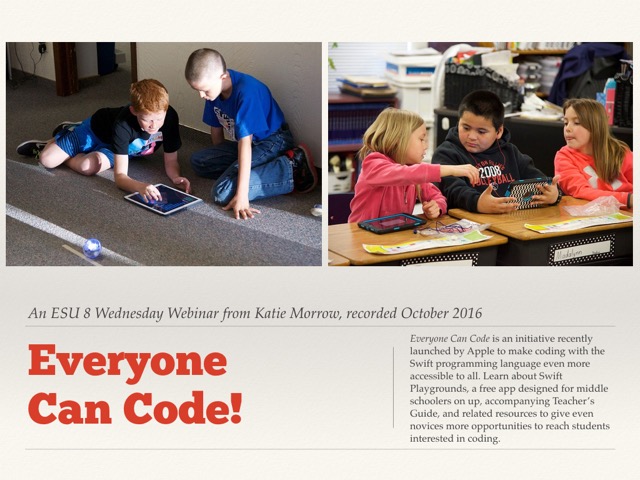
Everyone Can Code!

Everyone Can Code!
an ESU 8 Wednesday Webinar from Katie Morrow


Everyone Can Code is an initiative recently launched by Apple to make coding with the Swift programming language even more accessible to all. Learn about Swift Playgrounds, a free app designed for middle schoolers on up, accompanying Teacher’s Guide, and related resources to give even novices more opportunities to reach students interested in coding. 

View the webinar here

and check out the Links and Resources below:

Everyone Can Code (and Swift Playgrounds)
Wednesday Webinar 10-5-16


Swift Playgrounds app
*Requires iOS 10.0 or later
Designed for Middle School Students

Swift Playgrounds Teacher Guide

App Development with Swift
Designed for High School or College Students

App Development with Swift Teacher Guide

Additional Resources

Coding STEM kits available for check out through the ESU 8 Media Center

Tickle app (free, but requires newer iPad)

Ozobot for pre-coders

Coding for Kids blog post by Katie Morrow from last year

29989380921_e5c99b1221_z.jpg