Showing posts with label apple teacher. Show all posts
Showing posts with label apple teacher. Show all posts
Tuesday, March 31, 2020
Personalized Professional Learning with the Apple Teacher Learning Center
See how to use the Apple Teacher Learning Center for personalized professional learning any time, any place.

Tuesday, August 20, 2019
Tech Integration IGNITE!
 |
Visit the live agenda at bit.ly/2019techignite
|
Wormhole Challenge
Our kick-off activity was using the new green screen feature in iMovie on iPad to create examples of the "Wormhole Challenge". You can read more about how to replicate this activity on this blog post.
Apple 'Pop Up Classroom' Workbook
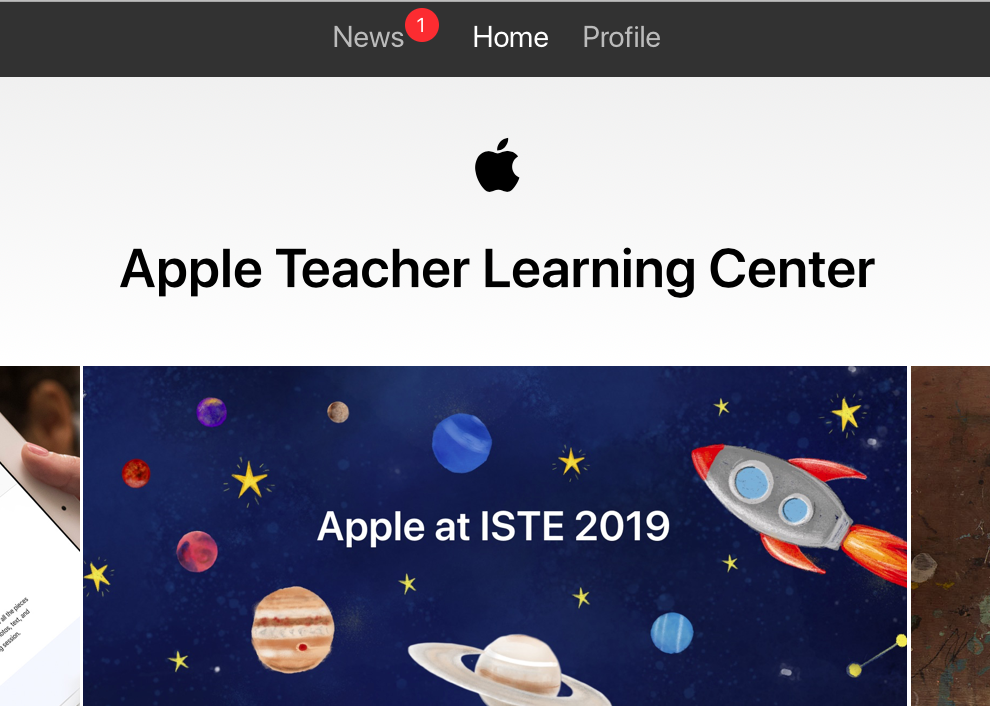
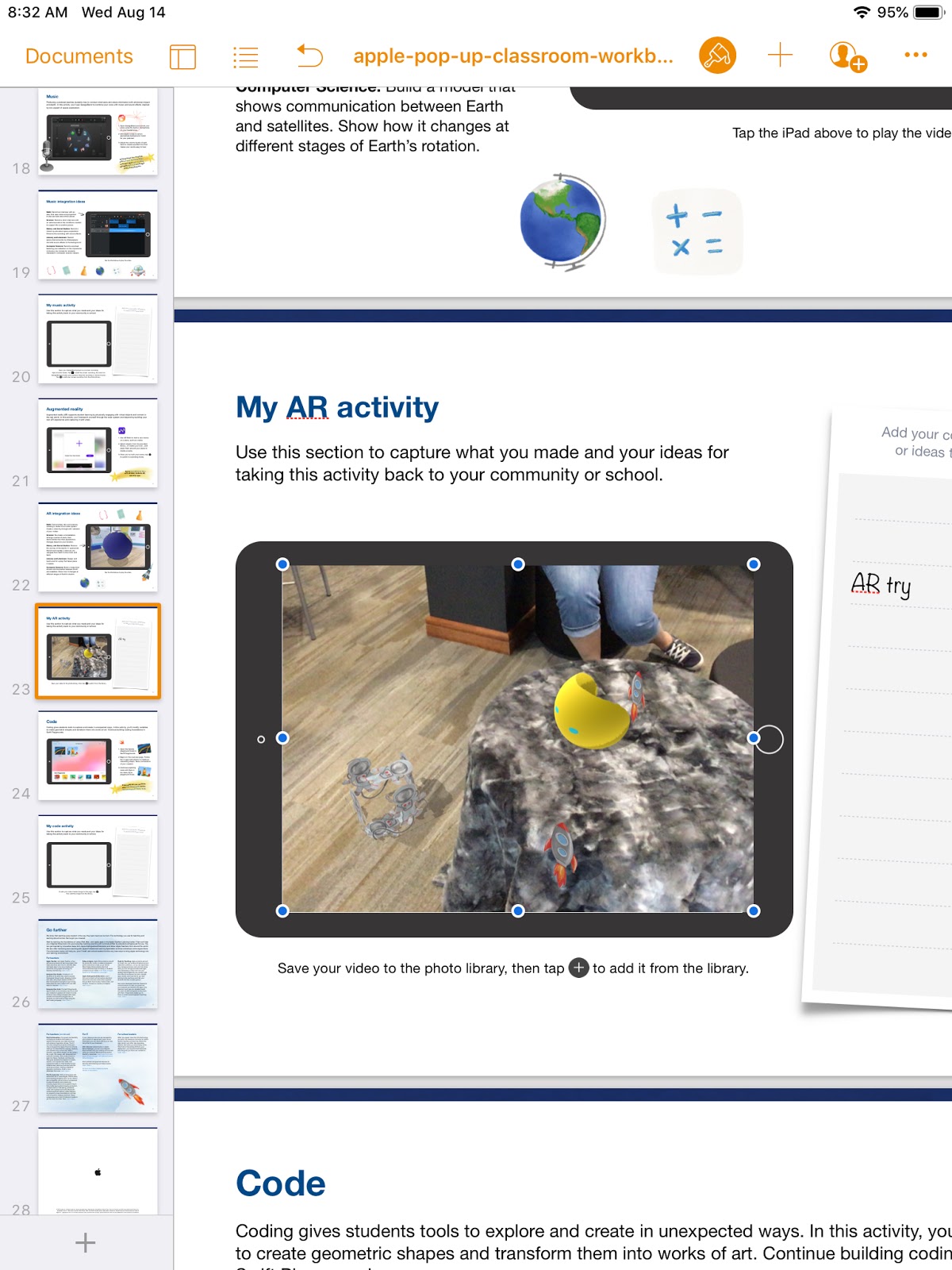
To demonstrate the possibilities of #EveryoneCanCreate with the built-in Apple apps on iPad, we worked through station activities shared at ISTE in Apple's "Pop-up Classroom" experience. Centered around a space theme, teachers were able to use a Pages workbook to try out drawing, photos, music, and augmented reality. (Video and coding activities are also included in the workbook). The entire resource was generously shared on the Apple Teacher Learning Center and you can download it too! Just look for the "Apple at ISTE 2019" tile.
- Drawing: Create a hand drawn note of a concept or idea involving the moon (in the Keynote or Pages app) and bring it life by adding line draw animation.
- Photos: Use the iPad camera's burst mode to capture a photo of a jump and then select a frame in midair. Use the markup feature to annotate and add a fact about weightlessness in outer space.
- Music: Create a Garageband recording for voice and interview your "friend from outer space" about life on the moon. Use the voice filters to make your audio recording sound authentic!
- Augmented Reality (AR): Use the AR Makr app to create a 3D AR model of the earth, moon, and sun... and put it into motion!

ESU 8 Digital Resources
There are so many resources provided for educators through our ESU 8 Digital Resources that it is always worth a reminder! Molly presented a refresher and new features sharing about World Book online, Learn 360, SNAP to check out physical items through the Media Center, Virtual Field Trips (VFTs) and Zoom.
Mission Control
During this portion of the workshop, we compared and contrasting two teaching tools to help you feel "in control" of your students' learning. We experienced a "getting to know you" lesson in the free versions of both ClassKick and Nearpod and then discussed differences, as well as times when both would be valuable.
 |
| Teacher View of ClassKick lesson in progress. |
 |
| Teacher View of Nearpod lesson overview. |
Demo Slam
Finally, Molly and I went head-to-head with a Demo Slam, designed to showcase a few more tech tools in a fast-paced way.
Goal-Setting
We concluded our IGNITE day by taking a look at our ESU 8 Tech Integration mission and then peruse some exemplars (including ISTE Standards, BlendED, BellevuePS ) to attempt to set individual professional goals for the upcoming school year. Don't forget that Katie and Molly would LOVE to come out to your classroom any time and assist with trying to reach those growth goals.

One final activity...
...was one we used with West Holt teachers in their back-to-school Tech Ignite Day. It was to introduce EdPuzzle, by way of using EdPuzzle. You can check it out below.


Monday, July 30, 2018
Getting to Know Your Students: Back to School Activity Ideas with Keynote Shapes
Many teachers may remember the brilliant "All About Me" project shared on the Apple Teacher Learning Center.

In it, students use the Shapes Library in Keynote in creative ways to share all about themselves.
This is a wonderfully simple and adaptable activity for those first days back to school.
Below I have shared some additional prompts for a similar "Getting to Know You" activity.
You can download the Keynote file (for Mac or iPad) and adapt it even further here:
Getting to Know Students- Shape Collages_blank template for Keynote
Or see some finished examples for additional inspiration.
How do you plan to use and customize the incredible Shapes Library in Keynote to get to know your students this school year?

In it, students use the Shapes Library in Keynote in creative ways to share all about themselves.
This is a wonderfully simple and adaptable activity for those first days back to school.
Below I have shared some additional prompts for a similar "Getting to Know You" activity.
You can download the Keynote file (for Mac or iPad) and adapt it even further here:
Getting to Know Students- Shape Collages_blank template for Keynote
Or see some finished examples for additional inspiration.
How do you plan to use and customize the incredible Shapes Library in Keynote to get to know your students this school year?
Wednesday, August 16, 2017
Do More With... iWork
Let's take a closer look at what sets Apple's iWork apps apart from other app suites by exploring a few skills and accompanying projects possible in Keynote.
Don't hesitate to begin with the free Starter Guides from Apple Teacher:
This iTunes U course demonstrates how to use the slide linking feature of Keynote to create "Choose Your Own Adventure" type stories.
And don't forgot about this Wednesday Webinar from last spring as an additional idea generator:
- Use Shapes Library & Drawing Tools --- to create --- Infographics
- Use Magic Move --- to create --- Animated Learning
- Use Links and invisible buttons --- to create --- Quiz Shows
Don't hesitate to begin with the free Starter Guides from Apple Teacher:
Next explore the big ideas outlined above:
Use Shapes Library & Drawing Tools --- to create --- Infographics
Use Magic Move --- to create --- Animated Learning
Ben Mountz's 'Magical' Presentation about Keynote's 'Magic Move'
Use Links and invisible buttons --- to create --- Quiz Shows
This iTunes U course demonstrates how to use the slide linking feature of Keynote to create "Choose Your Own Adventure" type stories.
 |
| https://itunes.apple.com/us/course/write-your-own-adventure-interactive-fiction/id1032400189 |
Wednesday, March 22, 2017
iMovie + Marzano (told with Adobe Spark Page)

And listen to Katie's added commentary with this ESU 8 Wednesday Webinar:
Monday, January 2, 2017
TOP 5 Easy New Year's Resolutions for Educators

"Out with the old; in with the new" is honestly NOT a phrase that should completely dictate our 2017 planning as educators. Research shows that much of the "old" that we are doing is good for kids, and there is no reason to abandon EVERY educational practice in exchange for the newest trends.
However, the start of a new calendar year, and a new academic semester for most, does encourage thoughtful reflection on the first 18 weeks of school. Along with that, it is an ideal time to infuse a few new practices for increasing the success of your classroom or campus. Here are my Top 5 recommended simple practices to incorporate immediately in 2017.
#5 - Connect your Classroom (Virtual Field trips or Zoom video conferences)
Although Virtual Field Trips are far from "new," the new year is a perfect reminder of their availability, simplicity, and educational power. Whether free or paid, interactive or not, synchronous or pre-recorded, a VFT can be a great entry point into a new unit of study, a review of key content, exposure to application of concepts in the real world, or even a classroom reward for work well done. As a reaffirmation to this time-honored practice, check out Matt Miller's (STI 2017 Keynote) latest post featuring 10 great virtual field trips for 2017.
New to ESU 8 educators this school year is the availability of free Zoom Pro licenses (contact Molly to get set up). Whether it be to share your screen for tech support purposes, collaborate with a colleague over distance, or simply launch an interview with an expert, Zoom is one of the easiest, most reliable tools currently available. And Zoom's newest features include some really powerful educational tools, including a green screen feature. To learn more about connecting your classroom globally, visit this recent ESU 8 presentation. Set a professional goal to launch at least one global collaboration experience for your students in the early months of 2017, and don't hesitate to reach out to ESU 8 for support.
#4 - Coding for Kids (Swift Playgrounds and drone robotics activities)
One unfortunate byproduct of the Hour of Code initiative is that schools restrict coding opportunities for students to that one week in December. Coding should be infused year-round for all ages and this new year is prime time to work in some coding activities in your classroom.
If you have access to iPads for students I would highly encourage starting with Swift Playgrounds. Apple announced their Everyone Can Code initiative this school year, consisting mainly of the new (and free!) Swift Playgrounds app (for newer iPads) and accompanying free Learn to Code Teacher's Guides and free video lessons on iTunes U. To be perfectly honest, teachers don't need to know a single thing about coding and still successfully lead the lessons that are laid out in these resources.
To read more about opportunities for exposing kids to the power of coding, visit this blog post from Hour of Code week 2016 at ESU 8. Also, contact us at ESU 8 to learn more about checking out Sphero SPRKs and/or Parrot mini drones to use for computer science activities in your school.
#3 - Online discussions (Canvas LMS or blogs)
Promoting more authentic dialogue for students has never been easier! If your classroom already has access to a Learning Management System (such as Canvas) you most certainly should take fuller advantage of the built-in features, one of the most powerful being discussions. While an obvious discussion prompt would be a question that all are expected to answer, there are many options for structuring it to promote additional skill development. (Delayed response, group moderated discussions, private student-teacher discussions, for example, are all possible with Canvas LMS.) Consider using an online discussion for your next: bell-ringer, scavenger hunt, back channel, daily skills practice, journalling activity, vocabulary practice, anticipatory set, brainstorming session, gallery showcase, or exit ticket.
Using a blog for authentic student dialogue is simple to get started as well. If your school is a Google Apps for Education school already, then every account already has access to their own Blogger space. Start a class blog and add your students as co-authors. Set up a calendar so that each student takes his/her turn as being the "daily blogger" and documenting each day's learning objective and activities. Alternatively, each student could begin the 2017 semester with their own individual blog. On it, they could post their best learning artifacts (portfolio), weekly progress updates, or personal reflections on their learning journey. Regardless, do not neglect to emphasize and model the powerful practice of commenting to make student discussion even deeper.
Coming Soon from ESU 8: a Wednesday Webinar (and Winter Workshop session) to help you get more from Canvas.
#2 - Breakout EDU
Coming back to school following a break is a perfect time to run a Breakout EDU in your school or classroom. The team-building and critical thinking benefits are vast; not to mention the opportunities to infuse current curriculum. If you haven't yet tried a Breakout EDU, I would recommend beginning with one of the featured games on breakoutedu.com. However, don't be afraid to stop there! Everyday there are more and more quality games being added to the published and sandbox games areas of the site. Consider searching for games aligned with your next unit or topic of study.
Don't have a Breakout EDU kit? Don't hesitate to reach out to us at ESU 8, as we have several kits available for checkout in the Media Center. In addition, multiple members of the professional development team are willing to come out to your classroom and help you administer your first Breakout EDU experience.
Yet another option is to try one of the newest digital breakout games. These require no physical locks or kits of any kind, as they can be completely solved on any web-enabled device. Beware, however, as there are no answer keys to these deductive puzzles!
#1 - Apple Teacher Program
In my opinion, there is no current, better way for personalized professional growth than the Apple Teacher Program. Simply register for the program with your Apple ID, download the free Starter Guides, and take the quizzes at your own time and place. Learning at your own pace is certainly appealing, as is the ability to retake quizzes over and over until you have mastered the content. Even if you already feel competent in your Mac or iPad skills, you are certain to learn new ideas for the classroom application of many built-in tools and apps. Read more about the Apple Teacher Program in this blog post from Edutopia.If you don't teach in an Apple environment, you might consider Google's similar certification program. While the quizzes do have a fee associated with them in the Google Certified Educator program, you can still access the study materials and learn from them for free.
Whatever path you choose, be sure to celebrate your accomplishments through the ESU 8 Certification Challenge. Submit your certification(s) achieved and enter your name in a drawing for a free technology integration day led by the ESU 8 Team.
 |
| http://www.esu8.org/edtech-certification-challenge/ |
So, there you have it... my Top 5 picks for educators to amplify their teaching in 2017. Choose one right now and commit to it as your professional New Year's resolution. Better yet, select more than one and work on progress towards those goals little by little. I guarantee you'll add new life to your classroom environment, and even without ditching ALL your past practices. As always, remember your ESU 8 partners are ready to work alongside you to help you achieve these goals and more.
Happy 2017 to all educators, near and far!
~Katie Morrow, ESU 8
Subscribe to:
Posts (Atom)