Tuesday, December 1, 2015

Augmented and Virtual Reality in Education

Augmented Reality: Make Learning Magically Come Alive!
Resources curated by Katie Morrow Last Update: November 2015


Terminology
A.R. - making something come to life
aura - the magic thing that pops up when you hold your device over something
trigger image - the normal picture that you want to make come to life
overlay - the thing you will apply on top of a trigger image (usually a video)
Aurasma and Blippar - free apps to make A.R.


(free book for iBooks from educator Paul Hamilton)


Experience A.R.


Uses of A.R.
  • book reports
  • oral reports
  • math worksheets
  • school promotion


Venues for A.R.
  • school hallways
  • project fairs
  • library book covers
  • student worksheets


Design your own Augmented Reality experience


Additional Resources


Aurasma Lesson Ideas from the iBooks Store:


Blippar book with lesson ideas from the iBooks Store:


Experience the Blue Angels in 360 degree video from your Chrome browser:


TED Talk on Virtual Reality and the Human Connection by Chris Milk
VRSE app: http://vrse.com


Google Cardboard in Education
Expeditions program: https://www.google.com/edu/expeditions/

Building a Student-Centered Learning Environment

Lately I have been working with schools on how to utilize technology to facilitate more student-centered learning.  The following resources are an introduction to various tools that can help educators get started with this important aim.


Presentation Tools
  • https://prezi.com/ - presentation software that Katie used to present.  Screen moves from slide to slide


Student Quizzes/Polling


Chrome extensions will show up on the top, right side of your browser.  Once you download them, you will have them every time you use a Chrome Browser.


  • Speakit! - Highlight text to speak
  • Screencastify - create screencasts on the chrome
  • DF Youtube - blocks all of suggested videos on the side of youtube videos


GoogleDocs
  • Suggesting Mode - (View -> Mode -> Suggesting) - leaves the original text on a Google Doc, but allows someone else to “suggest” revisions.  Student will have to go and resolve the issue
  • Revision History - (File -> See Revision History) - Google Docs saves all of revision history for a document
  • Dictation in Google Docs - (Tools -> Voice Typing) - Only in Chrome Browser - like Siri on your phone
  • GoogleDoc Add-ons - (Click Add-ons in Google Docs) - similar to Chrome Extensions
    • EasyBib - creates a citation in MLA or APA format for Google Docs


Translation
  • translate.google.com - has the ability to speak into google translate.  Does have the ability to translate an entire document, file, or website.


Collect and Curate


Communicate and Collaborate
  • Backchanneling - https://todaysmeet.com/ - use when showing a long video or long assignment.  Ask students questions in the backchannel to create interaction.  Help them watch the video with a purpose.
  • Blogging - http://blogger.com  - Can use to highlight daily learning, students can have their own blogs as well.  Is tied to a student’s google account.


Show What You Know
  • Screencastify Chrome Ext - capture video/audio on your computer
  • Google Slides - google’s version of PowerPoint.  There is the ability to share between students
  • Prezi (https://prezi.com/) - like a PowerPoint.  Creates zoom in and out slideshows.  This is the presentation tool Katie used during the presentation.
  • ThingLink - (https://thinglink.com) - upload picture, students add “hot spots” to explain the picture.  Students build in the buttons to highlight the information


Creation and Choice
  • Smore - (https://smore.com) online posters.  Can add videos, pictures, and text
  • Adobe Slate (https://slate.adobe.com)- Scrollable poster with images and words
  • Canva - (http://canva.com) Create visual elements for any project
  • Youtube Capture - record and edit videos right from YouTube


Padlet (https://padlet.com) - online corkboard for ideas.  Katie used at the end of the presentation

Sunday, October 18, 2015

Digital Citizenship Resources

Digital Citizenship Week is slated for all to take part in during the week of Oct. 18-24, 2015.  It is imperative, however, that we not address digital citizenship in one time or at one shot alone.  

The following resources are recommended from Edutopia and are useful options for schools to address digital citizenship in an ongoing, organized effort. 

  • Digital Literacy and Citizenship Curriculum for K-12: Common Sense Media’s interactive curriculum offers something for every grade level. Check out the "Scope & Sequence" tool to find the perfect lesson for your classroom. Plus, you can incorporate Digital Passport activities with students in grades 3-5, and their interactive assessments and videos are super engaging, as well.
     
  • Google Digital Literacy and Citizenship Curriculum : Produced in conjunction with iKeepSafe, Google's Digital Literacy curriculum provides three lessons to help students find reliable information online, manage their reputations, and recognize scams. Additionally, check out iKeep Safe's educator resources for professional-development modules for teachers and a variety of activities to use with students.
     
  • Search for Digital Literacy Lessons at MediaSmarts: MediaSmarts is an advocacy and education nonprofit based in Canada that seeks to provide kids with the skills they need to be responsible digital citizens. The organization features an extensive list of lessons on their website, and educators can search for activities based on grade, resource type, media type, and topic.
     
  • Lessons for Teaching Digital Citizenship from Cable Impacts: InCtrl is a series of lessons for students in grades 4-8 designed to introduce digital-citizenship concepts to students. Topics covered include media literacy, copyright laws, and privacy. Plus, teachers can browse lessons by subject and topic. Each lesson includes materials, as well as a lesson plan.
     
  • Resources for Teaching Digital Literacy from Digizen: Digizen is a repository of useful and engaging resources to teach students of all ages about becoming upstanding digital citizens. Produced by the U.K.-based child safety nonprofit ChildNet International, Digizen features videos, lesson plans, and games, and there are different sections for parents, students, and teachers.
     
  • Digital Citizenship Videos from the TeachingChannel: This TeachingChannel playlist of 30 videos highlights ways classroom teachers are introducing digital-citizenship concepts to students. There are resources here for every grade, and each video provides a lesson plan, as well. TeachingChannel teamed up with Common Sense Media to produce these lessons.
Related to this important topic, the annual Digital Citizenship Symposium was held on Wednesday, October 14.  ESU 8 schools who attended brought a team including students, staff, and patrons to ESU #7 in Columbus, NE. The event was held in conjunction with ESUs across the state and two other locations participated simultaneously.  Speakers for the day presented to everyone at once-- either in person at a site or via distance learning equipment to the external sites. In between the speakers, discussions and additional activities were held including the development of team action plans to bring digital citizenship best practices back to the attendees' schools. 
The theme for the day was T.H.I.N.K. and all participants brought back bracelets and poster reminders of this important motto. 
T - is it True?
H - is it Helpful?
I - is it Inspiring?
N - is it Necessary?
K - is it Kind?
Speakers for the day included Karen Haase, attorney from KSB School Law, Kenneth Schmutz, FBI Cyber Task Force, Omaha Division, and Jeremy Nielsen (Common Sense Media) and Heather Callihan. Many informative facts were tweeted throughout the day using the #nedcs2015 hashtag and even more information was collected on the Facebook page for the event. 


Tuesday, September 29, 2015

Google for Educators - Resources from introductory session with schools

The following resources are a sampling of what I have shared with schools interested in the possibilities of Google in education.  Basically, this is simply an overview what is possible.  Educators are encouraged to pick and choose several tools or things they want to try and then dig in more deeply with the many resources available.


Google Tools for Educators
Katie Morrow, ESU 8 Date: 09/22/15
**Slides available at http://goo.gl/0Lg2dw   
Search
Power User infographic
http://bgr.com/2014/08/13/top-25-google-search-tips-tricks/
Image Search - Search tools
Advanced Search

Mail
Contacts
Starring & Labels
Folders
Signature
Search
Calendar
Views
Sharing
Add event/Add calendar
Notifications
Invite others to event
Drive & Docs
Docs
NEW: Page Templates in Docs
font color vs. highlight
sharing settings
File > See revision history
Tools > Voice typing
Tools > Research
Insert > Comment
Forms & Sheets
Difference between forms & docs
Question types
Scripts & add-ons (Flubaroo & Auto-emailer)
Slides
Most epic Google Slides presentation ever!
Classroom
Intro to Google Classroom from Amy Mayer
Google Classroom Overview
Even More…
Youtube: Playlists & Channels
Blogger: Individual & Collaborative
Sites: Create a classroom website
Google Drawings: Interactive posters
Google Hangouts: Learn with others
Random Awesomeness
Google: “Set timer x minutes”
Groups
Translate
Google Alerts
Goo.gl URL shortener+
Add-ons & Extensions
Flubaroo (email graded form results)
Orange slice (rubrics)

20 Google Apps ideas for classroom innovation: http://ditchthattextbook.com/2015/08/31/20-google-apps-activities-for-classroom-innovation/

Monday, September 21, 2015

Creating Classroom Content with iBooks Author

The following resources are from a workshop with teachers on creating classroom content for iBooks with iBooks Author.  Explore the resources and don't hesitate to inquire more about these exciting possibilities for your classroom.

Digital handout for Creating Classroom Content with iBooks Author

Also, specific projects are pointed out on this blog post:
http://teach42morrow.blogspot.com/2015/09/ibooks-authoring-in-schools.html

Keeping current with ed tech opportunities across Nebraska

NETA (Nebraska Educational Technology Association) has recently made some exciting announcements that can benefit any Nebraska educator.

First of all, annual membership in NETA is free.  That's right: Zero dollars.  No matter what subject area or grade level you work with, everyone should consider signing up.  The only difference between the current free membership and the paid $35 annual membership is a printed newsletter.  But by signing up here anyone can receive the same information and announcements in digital format for no cost at all.  This is something that I highly recommend and a great way to stay current with the ever-changing field of educational technology in Nebraska schools.

Secondly, NETA has made some changes to its many contests.  And now that they offer free membership to the organization, anyone can enter!  There are contests for students and for teachers and some open categories, all designed to highlight the great things that Nebraska schools are already doing with technology (as opposed to creating an entry specifically for a contest).  Entries are all submitted digitally and winners receive a free NETA Conference registration plus substitute reimbursement for the two days of the April conference(held April 21 & 22 in Omaha), a really great experience for any educator. For teachers there is an app smashing contest, lesson idea contest, video contest, grant and ISTE attendance opportunities. Student contests include logo creation, graphic imagery, infographics, and more. Read more about the NETA Contests, including the submission deadlines, by visiting this link.

An exciting opportunity exists for us in Nebraska this upcoming summer as the International Society for Technology in Education (ISTE) is holding its annual conference in Denver on June 26-29, 2016.  For many of us this offers a way to attend a high-caliber international conference without having to purchase a plane ticket. To make travel even more feasible, NETA is looking into possibly sponsoring a bus, with various pickup/drop off points across the state. If this is something you are interested in, you can fill out this form to learn more. If you aren't interested in coordinating travel with others, consider attending on your own. You can read more about ISTE 2016 here.

Another technology-related resource to take a look at is a pre-recorded free webcast from Nebraska Department of Ed on digital citizenship appropriate for all to view:
NCompass Live: Your Digital Footprint: Managing Your Online Identity

Finally, if any school has a group of students doing really great things with technology, considering inviting them to share at the NASB (Nebraska Association of School Boards) Student Showcase. Held like a traditional vendor or project fair during their yearly conference, students would man a "booth" and share firsthand their expertise with educational leaders from across the state. This offers valuable experience in presentation and communication for our young people, as well as an opportunity to showcase the positive learning happening with technology in our schools. If you are interested in signing up, please visit this form.


Tuesday, September 8, 2015

Digital Citizenship expert Karen Haase

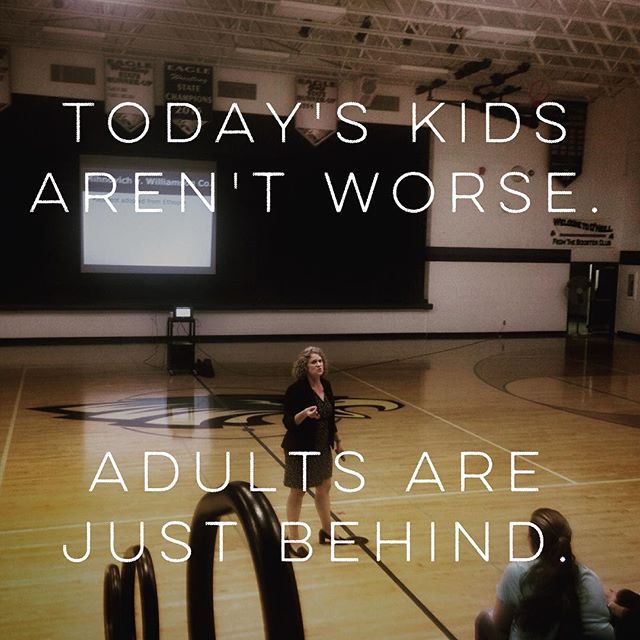
Karen Haase, an attorney with KSB School Law in Lincoln, presented to multiple audiences in O'Neill on August 27 to reinforce important issues related to digital citizenship.

Karen, a self-proclaimed expert in online behaviors and consequences, specifically with youth, speaks with deep knowledge and expertise. She frequently presents across the state of Nebraska and beyond on issue related to cyberbullying, sexting, and online safety.  Her multi-faceted message was well received by the three audiences she addressed: 6th-8th grades, 9th-12th grades, and parents/community members.  You can view her presentation to the 6th-8th graders by viewing O'Neill's Eagle Eye Broadcasting recording here:
http://thecube.com/event/digital-citizenship-presentation-karen-haase-526913

Karen's message is direct and impactful. Her law firm's mission rings true in her passionate delivery of content.
At KSB School Law we aren’t stereotypical stuffy, pretentious or coldhearted lawyer-types, who always speak in long paragraphs and write with a bunch of Latin terms.  We are passionate about public education and about serving the needs of our public school clients.  We advocate zealously for our clients in legal and other forums.  We speak and write clearly – we avoid using a lot of legal “mumbo jumbo” when we can, so that our clients and others can understand the important issues that need to be addressed.  We are not afraid to speak bluntly to our clients when necessary.  As a result we have forged deep relationships with each other and with our clients.  We truly love what we do! (from  http://www.ksbschoollaw.com on 8-28-15)
Whether we are a student just entering the online world of social media, or a teen who has already established an online presence, or an adult attempting to navigate these uncertain waters, each of us has much to learn.

Karen spoke passionately about not banning or blocking access to digital tools, but rather proactively participating and modeling positive behaviors in online collaborative spaces. In her words, "Kids today aren't worse. Adults are just behind."

@karenhaase speaking the truth to our community and beyond. #digitalcitizenshipforall #oneilleagles

Some of the many alarming statistics Karen shared with her audiences included:

  • 6 billion hrs of YouTube watched every minute
  • 95% of all teens have presence “online”
  • 70% of 12-13 old have cell phones
  • 91% of kids take/send/receive photos
  • daily teen texting up 200% since 2012
  • 205% increase in terroristic threats with teenagers in NE
  • 57% have been asked to send a sext before they graduate

Karen shared several actionable pieces of advice for any adult. First and foremost was the important reminder to be a positive example of the behaviors you wish your child to exhibit. Don't engage in negativity online and don't turn and look away when you see inappropriate online behavior.

Talk to your kids about what they will say WHEN they are asked to send a sext, because they will be asked. A humorous, but real comment that Karen once heard was, “Yes I will send you a naked pic of myself when you send one of yourself to my dad.”

Although no social media tool is ever 100% private or safe, there are precautions that we as adults should be aware of.  We should require our children to friend us on all social networks they use and monitor what they post.

Encourage our students to hold locked Twitter accounts.  With these, others can’t retweet their tweets, protecting students from additional damages. Also, you can set it up so that you get a text message every time certain people tweet.  This makes sense with our own children. 

Kids will claim that Snapchat is safe as the messages seem to delete after the receiver views them.  Karen explained that there are apps that send you a copy of every thing you receive on snapchat (with no notifications to sender) and our kids should be aware. 

Nothing in cyberspace is private. Talk through consequences - both short and long term. Kik Messenger is one app that we could completely discourage. It is full of pedophiles and not secure.

When our kids are gaming we need to ask them to take off the headsets so that we can hear what they hear.  Be active and involved. Talk to our kids about everything and remind them that a stranger online is just as dangerous as a stranger in real life. Hackers hack in while kids leave game stations running in background; this is a weakness that hackers have discovered. Kids need to know not to put cell phone numbers anywhere online.

It is more than acceptable to check up on our children with access to digital devices. Don’t let children charge phones in bedrooms and keep computers in public parts of house.  In Karen's house all devices have a 10:00 curfew. 

We can demonstrate the reality that nothing is truly anonymous by google searching our children's names.  Setting up google alerts on kids is another best practice for monitoring their online safety. 

The issues involved with digital citizenship today far surpass what one can learn about in an hour long presentation.  To learn even more, consider bringing a team to the Digital Citizenship Symposium on October 12. ESU 8 schools can send a team of participants (perhaps including teacher, administrator, parent, and students) to ESU 7 in Columbus. Here they will hear from Karen Haase and others and spend the day discussing an action plan to bring back to their communities.