Monday, September 12, 2016

West Holt English class publishes book in iBooks Store

Students from Mrs. Dohrman's sophomore English classes are published authors!


The West Holt High School English 10 classes recently achieved status as published authors in the iBooks Store.  Following a study of To Kill a Mockingbird by Harper Lee, the students partnered up to create chapters in a companion guide to the novel.  Tackling tough issues from the time period and themes from the story gave them the perfect backdrop for their Multi-Touch book. 


Each pair of students authored their chapters in iBooks Author on their Macs.  Using built-in widgets from iBooks Author, sound recordings from GarageBand, copyright-friendly images for photo galleries, and additional widgets from bookry.com, they made their writing come to life on the digital pages. Mrs. Dohrman along with Mrs. Morrow from ESU 8 compiled the student chapters into two book projects - one for each period of sophomores. 

Creating a Link with To Kill a Mockingbird
The first of the two books just recently passed the approval process and was released live in Apple's iTunes digital bookstore. Anyone with the free iBooks app can download this student project and view the interactive pages on their Mac, iPad, or iPhone. And look for the second edition by West Holt students to be released very soon. 


Wednesday, September 7, 2016

Digital Citizenship resources from Common Sense Education... Teachers, get them NOW!

Common Sense Education, longtime advocate for digital citizenship practices in schools, has just announced that their very popular iBooks textbooks will begin to cost money.

While this is disappointing news, it is encouraging that teachers have one whole month to still download any of the Digital Citizenship series for free. Better yet, all textbooks have just been updated! So if you have ever downloaded them in the past, be sure to update them sometime before October 1, 2016.

Below are the direct links to the four interactive student workbooks for iBooks along with the accompanying teacher's editions.

Grades K-2 Curriculum (Teachers Edition): Digital Citizenship Curriculum 2016
Grades K-2 Student Workbook: Digital Citizenship 2016

Grades 3-5 Curriculum (Teachers Edition): Digital Citizenship Curriculum Common Sense Education
Grades 3-5 Student Workbook: Digital Citizenship Common Sense Education

Grades 6-8 Curriculum (Teachers Edition): Digital Citizenship Curriculum Common Sense Education
Grades 6-8 Student Workbook: Digital Citizenship Common Sense Education

Grades 9-12 Curriculum (Teachers Edition): Digital Citizenship Curriculum 2016
Grades 9-12 Student Workbook: Digital Citizenship 2016


A final reminder to also consider last minute registration to send a team to the Nebraska Digital Citizenship Symposium, being held at various locations across the state on September 27, 2016. Read more about the details at this site: 


As always, don't hesitate to reach out to the Technology Integrationists at ESU 8 to answer any of your digital citizenship questions or needs. 

#bethekey


Tuesday, August 30, 2016

STEAM Camp Days at ESU 8


For two days in May, students from area schools came to ESU 8 in Neligh to explore, experiment, and expand their horizons in the area of STEAM Education.  STEAM stands for Science, Technology, Engineering, Arts, and Mathematics and the ESU 8 Professional Development Team hosted sessions for the students to rotate through. The first morning 6th through 8th grade students participated in hands-on STEAM activities. The next morning and afternoon were held for 3rd through 5th grade students.

This year's STEAM Camp offered opportunities to interact with:

  • Google Cardboard and virtual reality
  • SketchUp
  • Art and Constellations
  • Coding with drones and Spheros 
  • Electromagnetism
ESU 8 Professional Development team members can bring these same hands-on STEAM activities to your school! Simply contact one of them via email or call the ESU 8 main office.

View many photos from this year's STEAM Camp by visiting this Flickr album:


SMART Boards - Getting Started or Refresh of What's New

Whether you are just getting started using a SMART Board or have been using one for awhile and want to ensure you are taking full advantage of its features, you can benefit from the Ten Quick and Easy Tips shared in this presentation.  This was recorded informally for O'Neill Elementary teachers, but the information is pretty general and hopefully applicable to more.

View the recorded presentation here:

And access the digital handout here:
http://goo.gl/kXQFN3

Back to School with Google Education


Be sure to watch the recorded Hangout on Air from Mickie Mueller and Otis Pierce, moderators of the GEG Great Plains group, as they share Back to School updates from Google Classroom, Google Forms, and more. 

Highlights include:

Google Classroom
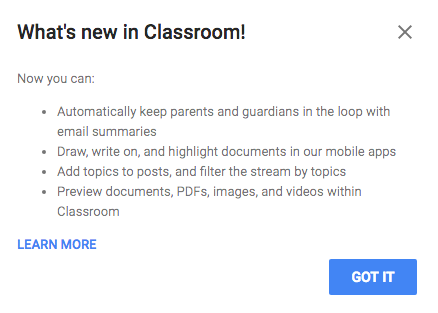
  • Topics (can be used similar to tags, for sorting & categorizing posts)
  • Default = no due date
  • Preview YouTube, documents, etc. right in Classroom window
  • Parent/Guardian access (you have to enable in Students tab and manually enter emails)
  • Schedule a post
Google Forms
  • Quizzes (MC, choose from a list, checkboxes) but no need to use Flubaroo for simple quick quizzes
  • Can send feedback (including a link) with corrected quizzes
  • Add pictures to answer choices on form questions


Also be sure to check out Mickie's guide to Google Classroom: 
https://sites.google.com/site/gclassroomguide/

And her Google Forms Quizzes playlist:
https://www.youtube.com/playlist?list=PLPv3PEdH_agtyeg9eIQH4q_LfjnlkwBLi

Monday, August 29, 2016

NNNC's Summer Technology Institute held June 1-2, 2016

On June 1-2, 2016 NNNC sponsored their annual Summer Technology Institute.  Held at Northeast Community College's Lifelong Learning Center, the event was attended by many educators enthusiastic to start their summer vacation with more learning.

Most sessions were presented by an educator "from the trenches" sharing best practices that truly work in their classrooms and schools.  Many presenters shared links and resources from their sessions via the Sched tool.  It can still be accessed here: https://nnncsummertechnologyinstitu2016.sched.org

STI 2016 Planning Team members

View photos from the two day event by visiting the following link:
https://flickr.com/photos/37327995@N00/sets/72157669299121526

Wednesday, August 17, 2016

Google Classroom with West Holt teachers

On Monday, we got to spend the day with West Holt teachers training on using Google Classroom and whats new on the Mac.  There was great enthusiasm and motivation to start their year off with technology infused classrooms.
Google Classroom Training agenda